
Best Instagram Aspect Ratios: 4:5 Portrait vs. Square vs. Landscape
Best Instagram Aspect Ratios: 4:5 Portrait vs. Square vs. Landscape
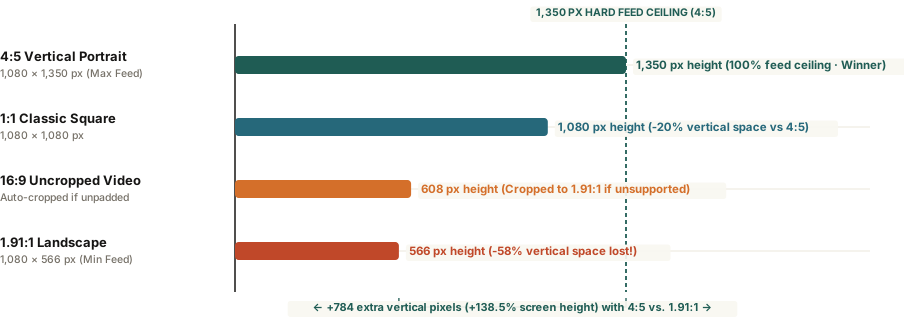
A 4:5 vertical portrait crop (1,080 × 1,350 pixels) occupies 78% more mobile screen real estate than a 1.91:1 horizontal landscape image and 25% more than a 1:1 square—maximizing scroll-stopping dwell time without cropping.
When photographers export a horizontal 3:2 or 16:9 image from Lightroom and upload it directly to the Instagram feed, the result is almost always underwhelming. What looked expansive and cinematic on a 27-inch desktop monitor shrinks into a narrow horizontal ribbon on a smartphone screen—occupying less than a third of the vertical display while two other posts compete for the viewer's attention above and below it.
Because Instagram locks every feed image to a standard width of 1,080 pixels, your choice of aspect ratio directly determines how many vertical pixels your photo commands on screen. Understanding the exact math behind Instagram's three native feed containers—and how to slice wide horizontal images across multi-slide 4:5 carousels—lets you maximize screen real estate without sacrificing wide-angle compositions.
The Pixel Math: Why 4:5 Portrait Dominates the Feed
Instagram's feed layout engine enforces two hard aspect ratio boundaries for single image posts and carousels: a minimum flat limit of 1.91:1 and a maximum tall limit of 4:5. Any image uploaded outside those bounds is automatically center-cropped unless you add padding:
- 4:5 Vertical Portrait (1,080 × 1,350 px): Delivers 1,458,000 total pixels. At 1,350 pixels tall, it fills virtually the entire vertical viewport between the top account header and bottom caption bar on a modern phone—25% taller than a square and 138.5% taller than a landscape post.
- 1:1 Classic Square (1,080 × 1,080 px): Delivers 1,166,400 total pixels. Gives up 270 vertical pixels (20% of the available height) compared to a 4:5 crop.
- 1.91:1 Landscape (1,080 × 566 px): Delivers just 611,280 total pixels. A standard 3:2 camera photo (1,080 × 720 px) or 4:5 vertical crop holds more than double the visual detail of a 1.91:1 strip.
In a vertical scrolling feed where width is fixed at 1,080 pixels, aspect ratio is not just a framing choice—it is a 2.38× multiplier on screen area.
How to Showcase Wide Photos Using 4:5 Panoramas
You do not have to abandon horizontal landscape photography to capture the 1,350-pixel vertical ceiling. Instead of uploading a single wide image that shrinks to 566 pixels high, place your wide 3:2 or 16:9 image across a two-slide (2,160 × 1,350 px) or three-slide (3,240 × 1,350 px) 4:5 master canvas and slice it at exact 1,080-pixel intervals.
When building carousels, remember two technical constraints: the first slide locks the aspect ratio for every subsequent slide in the post, and profile grid thumbnails display the center 1:1 square (or 3:4 center crop) of Slide #1—so keep essential typography away from the top and bottom 135-pixel edges. You can Plan multi-slide carousels in BatchPad to slice wide photography into zero-gap 4:5 vertical slides automatically.