How to Split a Panorama Across an Instagram Carousel
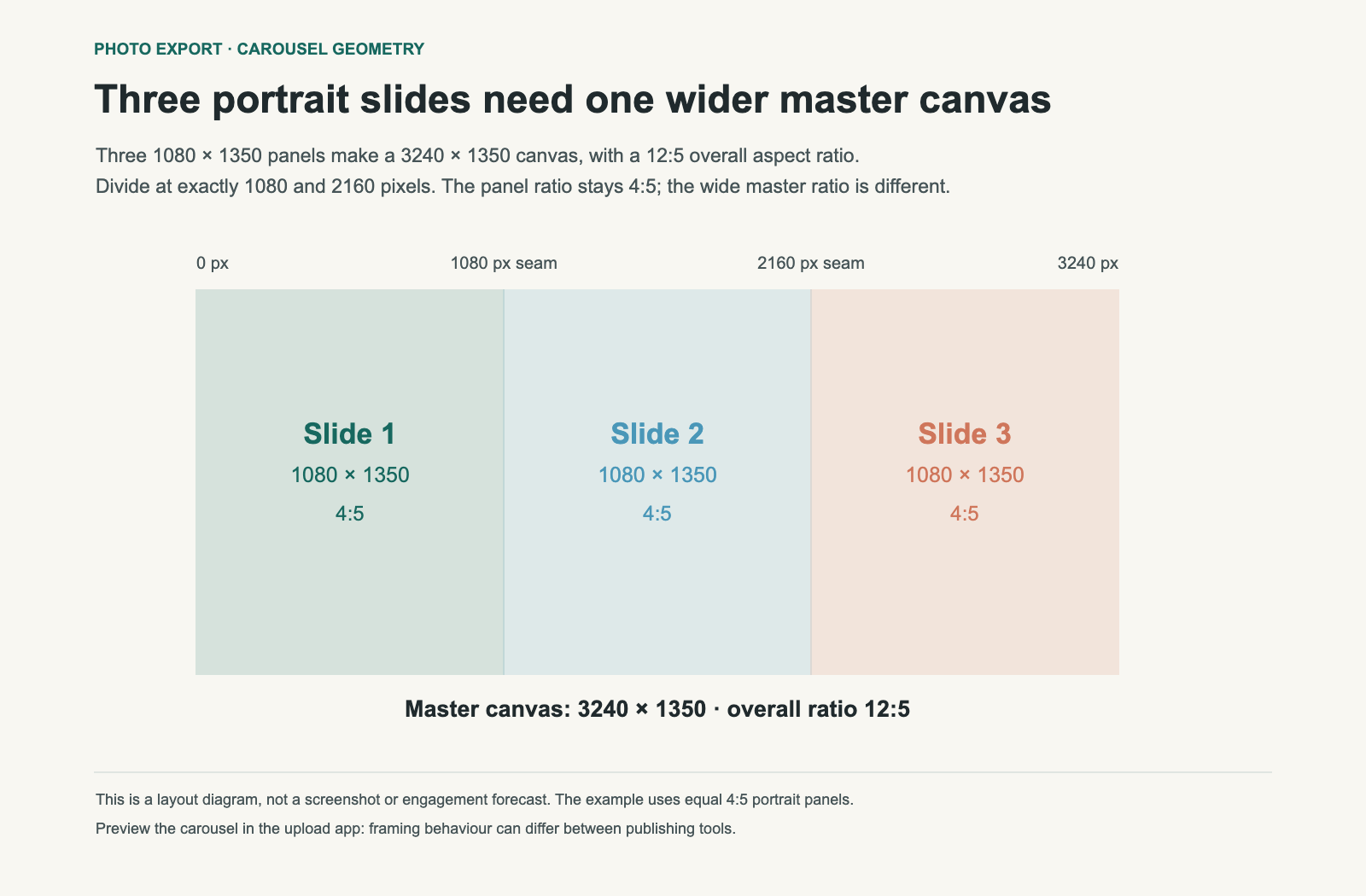
A three-slide panorama made from 4:5 portrait panels needs a 12:5 master image. The number of panels tells you how much wider the complete canvas becomes; the shape of each panel still determines its height.
Picture a skyline with a tower near the centre. You want the view to continue across three swipes. If you first crop it to 3:1 because there are three slides, then force each piece into a portrait frame, something has to be cropped or padded. Calculating the master canvas first avoids that surprise.
Calculate the canvas before slicing
For N equal panels, multiply the panel width by N and keep its height. If a panel is 1,080 × 1,350, three panels require 3,240 × 1,350. Reduce the ratio and you get 12:5.
| Panel shape | One panel | Three-panel master | Master ratio |
|---|---|---|---|
| Square | 1,080 × 1,080 | 3,240 × 1,080 | 3:1 |
| 4:5 portrait | 1,080 × 1,350 | 3,240 × 1,350 | 12:5 |
| 3:4 portrait | 1,080 × 1,440 | 3,240 × 1,440 | 9:4 |
The last row shows the geometry if you choose a 3:4 format supported in your upload flow. Check the app's current options and preview before preparing the complete set. Platform presentation can change independently of this math.
Compose for individual slides as well as the whole view
The entire panorama can look balanced while its first slide contains only empty sky. Place enough visual interest in the opening panel for it to make sense on its own. Then let a road, horizon or repeated shape carry the viewer into the next frame.
Avoid placing the most important face, lettering or landmark directly on a cut. Continuity can survive a seam, but a viewer may pause on an individual slide. A slightly different master crop can put a key subject safely inside a panel without changing the overall idea.
Keep edits consistent across the seam
Edit exposure, colour and the overall crop on the complete master, then slice it. Separate auto adjustments can make neighbouring panels differ in brightness or colour. The seam becomes visible even when the pixel coordinates are correct.
For the three-panel example, cut at horizontal positions 1,080 and 2,160. Use equal integer widths and the same export settings. Number the files in order. A panel accidentally uploaded out of sequence can look like a crop error.
Check these four things before posting
- Dimensions: every panel has the same width and height.
- Sequence: the right edge of panel one continues into the left edge of panel two.
- Alignment: the horizon and other long lines remain at the same height.
- Upload preview: the app has not applied a new crop, rotation or padding to a panel.
A carousel uses several frames to reveal more of the scene; it does not preserve all the source file's detail automatically. Each frame still has a finite output resolution and can undergo platform processing. See why a large camera file can look softer in a feed for the resizing part.
When a panorama split is useful
A continuous landscape, long interior or horizontal illustration can work well. An image that needs all its parts visible at once may be better as a single landscape frame. A carousel asks the viewer to reconstruct the complete image over several swipes.
BatchPad is useful for preparing consistent image dimensions. The sizing diagram here is a geometry example, not a claim about automatic panorama slicing in any particular app. Download the panel dimensions.