
Instagram Image Sizes and Aspect Ratios: Why 4:5 (1080x1350) Takes Up 25% More Screen Space Than 1:1
On a mobile feed, width is fixed: Instagram clamps every post across the full width of the phone screen at a standard delivery resolution of 1,080 pixels wide (Instagram Image Size Guide 2026 - Buffer). Because horizontal width never changes, your image's aspect ratio is the single mathematical lever that controls how many vertical pixels—and how much physical screen real estate—your photograph occupies as a viewer scrolls (Instagram Post Size: 1080×1350 (4:5) - PostFast).
For photographers shooting on 3:2 full-frame or APS-C cameras (24×36 mm sensor geometry), uploading unpadded images forces an unpleasant choice between shrinking a horizontal shot to 1080×720 px or slicing 16.7% off a vertical portrait—a trade-off you can solve cleanly when you Pad and export crisp social carousels in BatchPad.
The 1,080-Pixel Width Rule: Exact Pixel Math Across Every Aspect Ratio
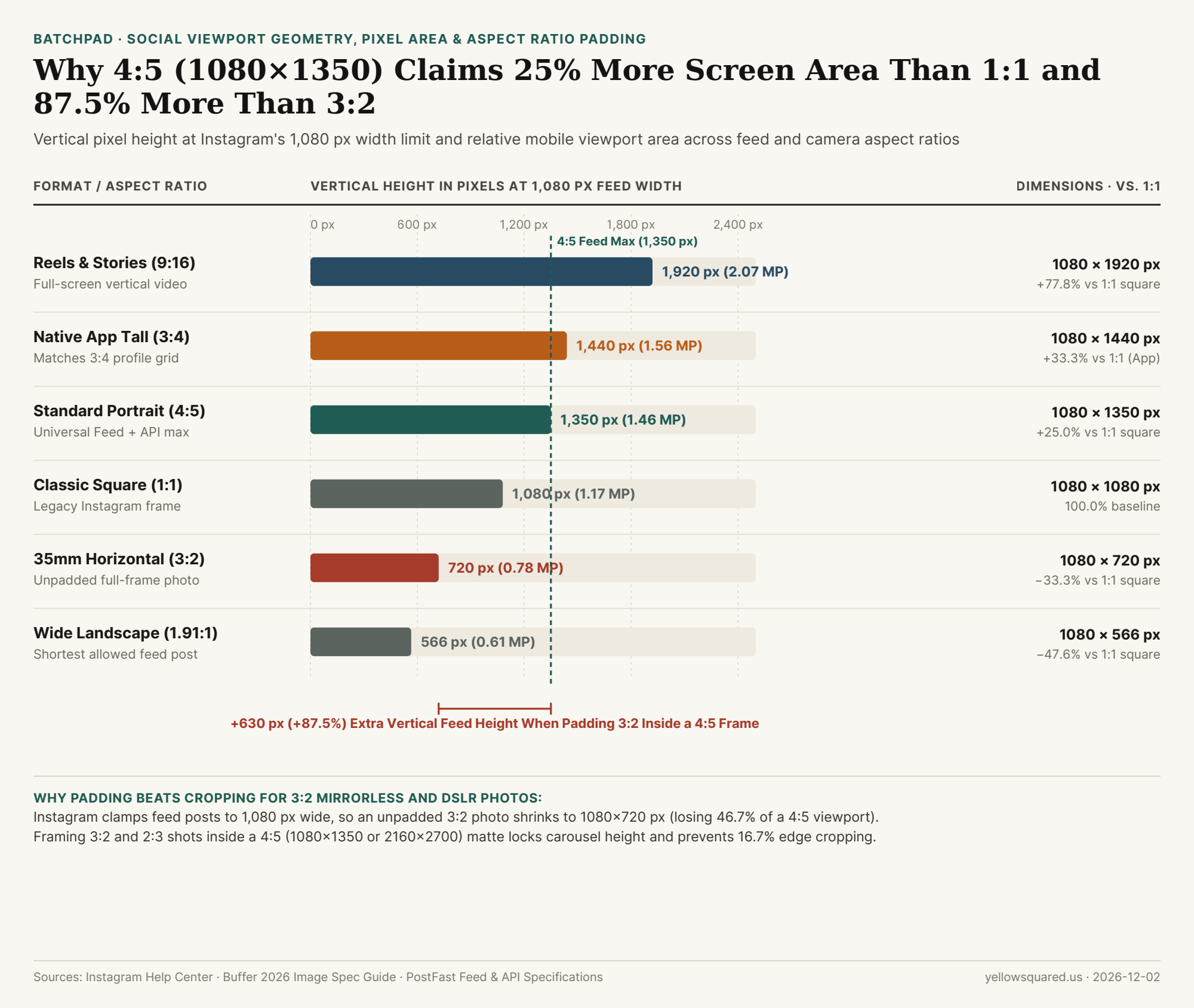
When Instagram's image pipeline ingests a photo wider than 1,080 px, it downscales the width to 1,080 px and sets the vertical height proportionally (H = 1080 × (height_ratio / width_ratio)) (Free Instagram Image Resizer & Size Guide - Buffer). Comparing every standard format against the classic 1:1 square (1,080 × 1,080 = 1,166,400 pixels) shows the exact viewport multiplier:
- 1.91:1 Wide Landscape (1080 × 566 px = 611,280 px): The shortest aspect ratio Instagram allows without auto-cropping. It occupies just 52.4% of the screen area of a square post and 41.9% of a
4:5portrait (Buffer 2026 Spec Guide). - 3:2 Full-Frame Horizontal (1080 × 720 px = 777,600 px): A native horizontal frame from a Nikon, Sony, Canon, or Fujifilm camera renders at
720 pxtall—occupying 66.7% of a square post and losing 630 vertical pixels compared to4:5. - 1:1 Classic Square (1080 × 1080 px = 1,166,400 px): The
100.0%baseline. Cropping a horizontal3:2photo to1:1discards 33.3% of your composition (1/3of the horizontal sensor width). - 4:5 Standard Portrait (1080 × 1350 px = 1,458,000 px): At
1,350 pxtall,4:5delivers +25.0% more vertical height and pixel area than a1:1square (+291,600 pixels) and +87.5% more height than an unpadded3:2horizontal photo (1350 / 720 = 1.875) (PostFast). - 3:4 Native App Tall Portrait (1080 × 1440 px = 1,555,200 px): Instagram's mobile app supports
3:4uploads (+33.3%larger than1:1, matching the updated3:4profile grid), whereas Meta's Graph API for third-party schedulers and feed ads caps vertical feed images at 4:5 (1080 × 1350 px) (PostFast). - 9:16 Reels & Stories (1080 × 1920 px = 2,073,600 px): Fills
177.8%of a square in the dedicated Reels and Stories tabs, but gets center-cropped in the main feed and profile grid.
"Because every Instagram feed post is locked to 1,080 pixels wide, switching your export canvas from 3:2 (720 px tall) to 4:5 (1,350 px tall) increases your vertical screen presence by 87.5%."
Why Mixed-Orientation Carousels Fail Without Aspect Ratio Padding
Instagram enforces a strict first-slide aspect ratio lock on every multi-photo carousel: whatever aspect ratio you choose for Slide 1 (1:1, 4:5, or 3:2) becomes the rigid crop box for Slides 2 through 20 (Buffer 2026 Spec Guide). If Slide 1 is a vertical 4:5 portrait (1080×1350) and Slide 2 is a horizontal 3:2 wide shot, Instagram slices 46.7% of the horizontal width off Slide 2 so it fits the vertical 4:5 box. Even on a single vertical 2:3 full-frame portrait (1080×1620), uploading directly to a 4:5 (1080×1350) frame crops 270 vertical pixels (16.7% of the image height) off the top and bottom.
| Instagram / Camera Format | Aspect Ratio | Pixel Dimensions | Total Pixel Area | Area vs. 1:1 Square | 3:2 / 2:3 Crop Loss |
|---|---|---|---|---|---|
| 1. Reels & Stories Fullscreen | 9:16 |
1080 × 1920 px |
2,073,600 px |
177.8% (+77.8%) | −52.9% off 3:2 width |
| 2. Native App Tall Portrait | 3:4 |
1080 × 1440 px |
1,555,200 px |
133.3% (+33.3%) | −11.1% off 2:3 height |
| 3. Standard Feed Portrait | 4:5 |
1080 × 1350 px |
1,458,000 px |
125.0% (+25.0%) | −16.7% off 2:3 height |
| 4. Classic Square Post | 1:1 |
1080 × 1080 px |
1,166,400 px |
100.0% (Baseline) |
−33.3% off 3:2 width |
| 5. Full-Frame Horizontal | 3:2 |
1080 × 720 px |
777,600 px |
66.7% (−33.3%) |
0.0% (Loses 630 px height) |
| 6. Wide Landscape Limit | 1.91:1 |
1080 × 566 px |
611,280 px |
52.4% (−47.6%) |
−21.4% off 3:2 height |
How to Pad Mixed 3:2 and 2:3 Photos Into a Unified 4:5 (2160×2700) Carousel
Instead of letting Instagram's server crop your compositions or shrink your horizontal frames to 720 px tall, pad every image in your sequence onto a uniform 4:5 portrait canvas (1080 × 1350 px or 2x Retina 2160 × 2700 px) with clean gallery borders (#f9f7f1 warm paper, #ffffff studio white, or #141312 darkroom matte). That way, every slide in your carousel claims the full 1,350 px vertical viewport height while preserving 100% of your 3:2 horizontal and 2:3 vertical camera frames. To batch-frame mixed-orientation shoots with uniform borders and editorial title cards in seconds, Pad and export crisp social carousels in BatchPad.