
What Are Lighting Ratios (2:1, 4:1, and 8:1) in Portrait Photography and Video, and How Do F-Stops Control Contrast?
Whether you are setting up a two-light studio portrait, positioning a softbox beside a window, or dialing in a dual-screen monitor fill for a video call, the three-dimensional mood of a human face is governed by a single photometric number: the lighting ratio. As defined in standard cinematography and photography photometry and the Defense Information School (DINFOS) studio lighting curriculum, a portrait's lighting ratio compares total illumination falling on the highlight side of the face (Key + Fill) against the shadow side of the face (Fill alone). Because every 1.0 f-stop (1 EV) step doubles or halves light intensity (2^ΔEV : 1), a simple 1-, 2-, or 3-stop difference between cheeks transforms a portrait from a friendly 2:1 headshot into a dramatic 4:1 Rembrandt portrait or a brooding 8:1 low-key character study.
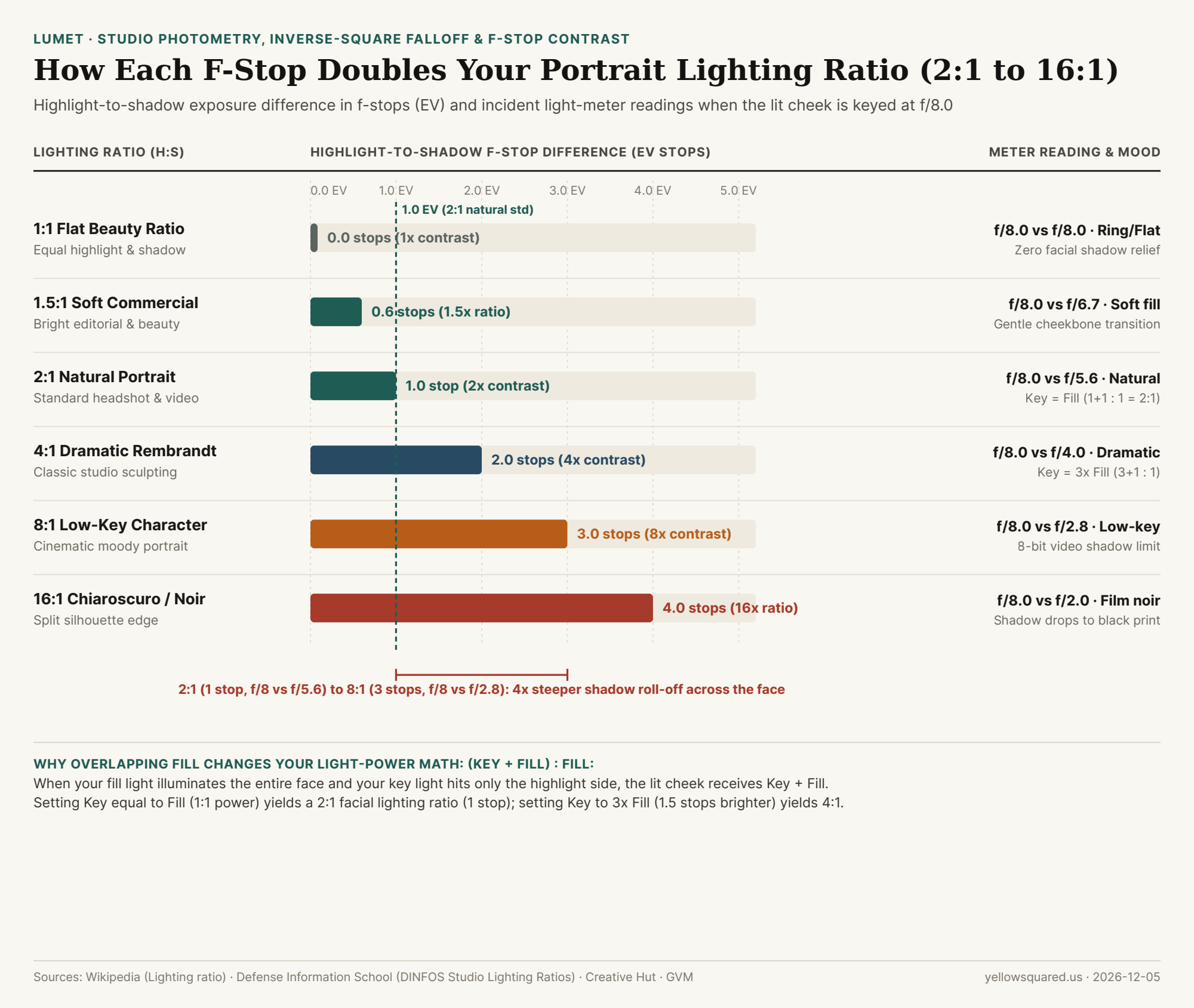
f/8.0. Data: Wikipedia (Lighting ratio), DINFOS Studio Lighting Ratios, and Creative Hut (download CSV).Why Overlapping Fill Light Changes the Math: (Key + Fill) : Fill
The most common mistake beginners make when setting up a two-light portrait is confusing the lamp power ratio (Key-only : Fill-only) with the facial lighting ratio (Highlight side : Shadow side). As explained in Creative Hut's f-stop lighting ratio guide and GVM's studio lighting reference, when your fill light is placed near the camera axis so that it illuminates both sides of the subject's face equally, and your key light is placed at a 45° angle so it illuminates only the highlight cheek, the two lights add together on the highlight side:
- How to Build a
2:1Ratio (1.0 StopDifference): If you set your Fill light to1 unitof illuminance across the whole face and your Key light to1 unitof illuminance on the lit cheek, the highlight side receives1 (Key) + 1 (Fill) = 2 unitswhile the shadow side receives1 unit (Fill)—producing a2:1facial lighting ratio (1.0 EVdifference, e.g., highlight cheek metersf/8.0and shadow cheek metersf/5.6). - How to Build a
4:1Ratio (2.0 StopsDifference): To make the highlight side4xbrighter than the shadow side when Fill wraps across the whole face, the Key light alone only needs to deliver3 unitsof light (~1.5 stopsbrighter than Fill alone), because3 (Key) + 1 (Fill) = 4 unitson the highlight cheek versus1 uniton the shadow cheek (4:1total contrast, meteringf/8.0vs.f/4.0). - When You Meter the Cheeks Directly (Shielded Incident Dome): If you hold an incident light meter at each cheek and shield the dome so each side reads total light arriving on that plane independently, the math is pure powers of two:
1 stop = 2:1,2 stops = 4:1,3 stops = 8:1, and4 stops = 16:1.
"A 2:1 lighting ratio—where the shadow cheek sits exactly 1 f-stop below the highlight cheek—is the universal sweet spot for natural portraiture and video: it carves out cheekbone structure without deepening eye bags or skin texture."
Comparing 1:1, 2:1, 4:1, 8:1, and 16:1 on Skin Texture and 8-Bit Video
While a modern full-frame raw sensor captures 12 to 14 stops of dynamic range, compressed 8-bit sRGB web video (such as Zoom, Teams, or standard streaming codecs) and photographic paper prints have a much tighter tonal envelope:
1:1to1.5:1(0.0 to 0.6 Stops— High-Key & Beauty): Zero to half a stop of difference fills every pore and under-eye crease, ideal for cosmetics campaigns and ring-light setups, though1:1alone can make round faces appear wider and flatter.2:1(1.0 Stop— Natural Headshot & Video Standard): With the shadow side at50%of highlight luminance (f/8.0vs.f/5.6), facial planes gain natural three-dimensional depth while preserving clean catchlights and shadow detail in both 8-bit webcams and print.4:1(2.0 Stops— Classic Rembrandt & Loop Portraiture): At25%shadow luminance (f/8.0vs.f/4.0), the characteristic Rembrandt triangle of light under the shadow-side eye stands out clearly, creating authoritative editorial and character portraits.8:1to16:1(3.0 to 4.0 Stops— Low-Key & Film Noir): At3 stopsdown (8:1,12.5%shadow luminance) and4 stopsdown (16:1,6.25%luminance), shadows approach the compression noise floor of 8-bit video and drop toward pure black on matte prints unless carefully graded.
| Lighting Ratio (H:S) | F-Stop Diff (EV) | Highlight Meter | Shadow Meter | Key : Global Fill Power | Portrait & Video Rendering Character |
|---|---|---|---|---|---|
| 1:1 (Flat Beauty) | 0.0 EV |
f/8.0 |
f/8.0 |
0:1 (Even wrap) |
Shadowless beauty, fashion ring-lights & passport ID |
| 1.5:1 (Soft Commercial) | 0.6 EV |
f/8.0 |
f/6.7 |
0.5:1 + Global Fill |
Soft corporate headshots & bright editorial interviews |
| 2:1 (Natural Standard) | 1.0 EV |
f/8.0 |
f/5.6 |
1:1 Key + Fill |
Universal portrait & video call standard; full shadow detail |
| 4:1 (Dramatic Studio) | 2.0 EV |
f/8.0 |
f/4.0 |
3:1 Key + Fill |
Classic Rembrandt & loop sculpting with rich shadow relief |
| 8:1 (Low-Key Drama) | 3.0 EV |
f/8.0 |
f/2.8 |
7:1 Key + Fill |
Moody theatrical portrait; nears 8-bit webcam shadow floor |
| 16:1 (Chiaroscuro) | 4.0 EV |
f/8.0 |
f/2.0 |
15:1 Key + Fill |
Stark film-noir split light; shadow side silhouettes on print |
How to Balance Key and Fill Ratios on Your Desk
If you sit beside a bright side window during daytime video calls, your face often experiences an accidental 8:1 or 16:1 split lighting ratio—blowing out the window-facing cheek while plunging the opposite eye into noisy webcam shadow. Placing a soft screen-based fill light on the shadow side of your monitor lifts the dark cheek by 1 to 2 stops, bringing your webcam contrast back into a flattering 2:1 or 4:1 ratio. Dial in warm and daylight key-light presets in Lumet to balance your desk lighting ratio in seconds.