
What Is 'Phantom' Airline Award Space? How to Verify Partner Seats Before Transferring Points
What Is 'Phantom' Airline Award Space? How to Verify Partner Seats Before Transferring Points
It is the most expensive rite of passage in award travel: you spot two saver Business Class seats to Tokyo or Paris on a partner airline's search calendar for 75,000 miles. Excited that someone else might grab them, you log into your credit card portal, transfer 150,000 hard-earned points into the airline's loyalty program, and click "Book"—only to be greeted by a red banner reading: "We're sorry, the flights you selected are no longer available." You refresh the search page, and the two seats are still sitting right there on the calendar! You just encountered phantom award availability.
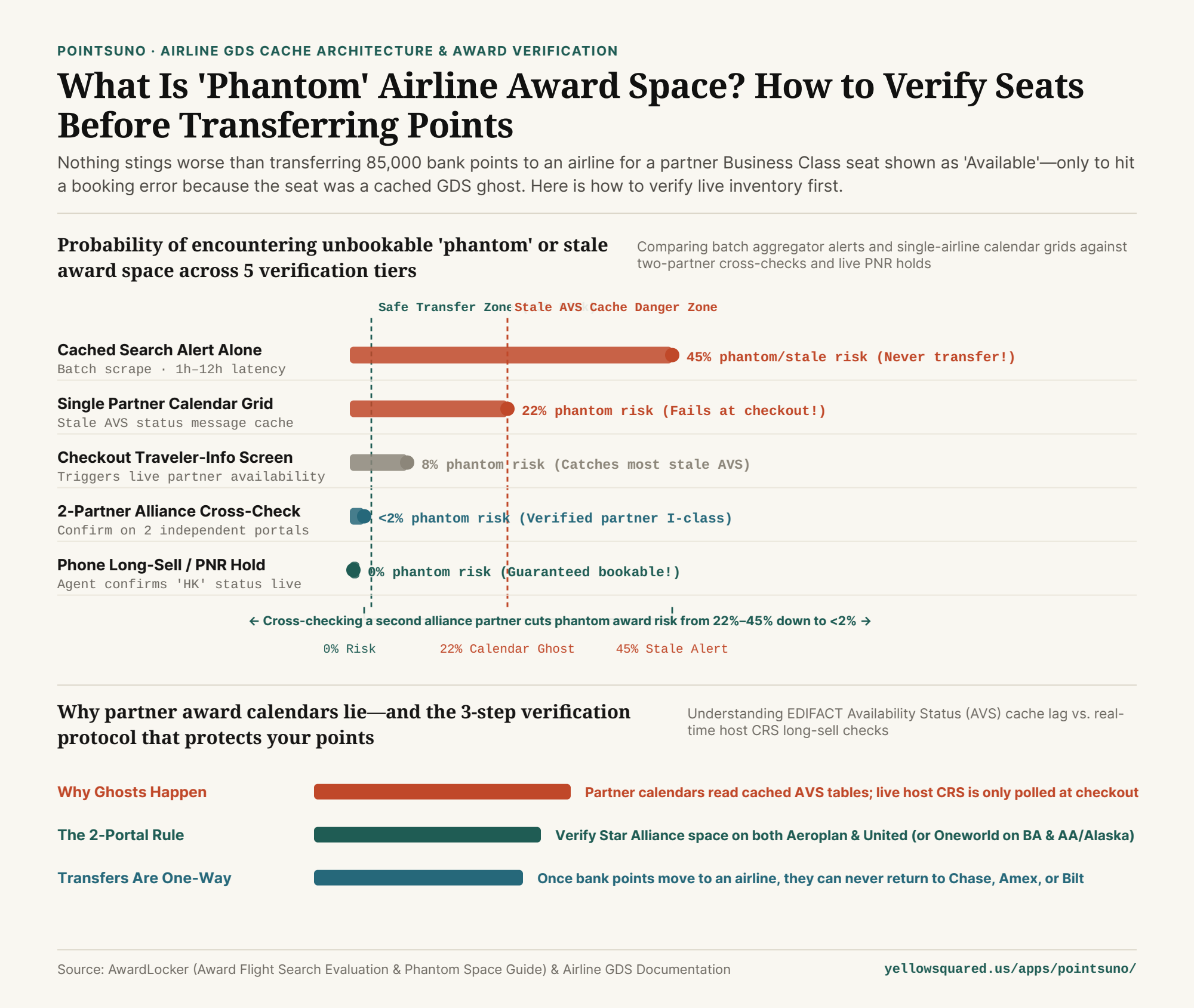
1. Why Airline Websites Display Ghosts: AVS Cache Desynchronization
Why would Air Canada Aeroplan, United MileagePlus, Virgin Atlantic, or British Airways show a partner seat on their search results page that doesn't actually exist? The culprit is how airlines exchange inventory data across Global Distribution Systems (GDS) like Amadeus, Sabre, and Travelport.
Querying an operating airline's live host Computerized Reservation System (CRS) in real time costs money and bandwidth for every single search. To keep search engines fast and cheap, partner airlines rely on cached Availability Status (AVS) messages—lightweight numeric flags (such as I2 or I0 for Business Saver Award space) pushed over legacy EDIFACT links. As documented in AwardLocker's technical evaluation of award search engines and empirical booking reports across major loyalty programs, phantom space appears when:
- Dropped AVS Update Messages: The last saver seat on a partner flight is booked (flipping the host CRS from
I1toI0), but the partner airline's local cache misses or delays the update—continuing to show1 seat availableon the initial search grid. - Bilateral Partner Quota Blocks: An operating carrier shows saver space to its own members (or to Partner A), while applying a background bilateral block against Partner B that only triggers when Partner B's checkout engine attempts a live Long Sell (`SS`) request.
"An airline search calendar does not show live seats on the plane—it shows a cached snapshot. The real-time handshake with the operating airline's computer only happens when you click through to the passenger checkout page."
2. The Three-Step Pre-Transfer Verification Protocol
Because points transferred from flexible bank currencies (Chase Ultimate Rewards, Amex Membership Rewards, Capital One, Citi, or Bilt) to an airline program can never be reversed, always run this 60-second verification checklist before moving a single point:
- Click all the way to the Passenger / Payment screen: Never trust the 30-day calendar or the initial flight list. Clicking through to the traveler-information screen forces most booking engines to replace their cached AVS number with a live GDS availability poll.
- Cross-verify on a second independent alliance partner: If you are booking a Star Alliance partner flight (e.g., Lufthansa, Swiss, ANA, or EVA Air), check that the exact same flight and cabin appear on both Air Canada Aeroplan and United MileagePlus. For Oneworld flights (e.g., Japan Airlines, Qatar Airways, Iberia), cross-check across British Airways, American Airlines, and Alaska Airlines. If Partner A shows 2 seats and Partner B shows 0 seats, treat Partner A's listing as a phantom ghost until proven otherwise.
- Call to confirm live `HK` status (or place a hold): Programs like Air France/KLM Flying Blue and calling agents at Aeroplan or British Airways can test-sell the segment in their terminal to confirm it returns
HK(Hold Confirmed) rather thanUC(Unable to Confirm) while you are on the line.
3. Phantom Award Risk & Verification Hierarchy Table
Compare how inventory polling works at each stage of an award search and how to eliminate stranded-point risk (available in what-are-phantom-award-seats-and-how-to-avoid-stranded-points.csv):
| Verification Stage | Inventory Polling Method | Phantom Failure Rate | When Live Sync Happens | Stranded-Point Risk | Recommended Action |
|---|---|---|---|---|---|
| 1. Cached Search Alert | Batch scrape (1h–24h old) | 35%–50% stale/ghost | Not synced until live search | Extreme | Use for discovery only |
| 2. Single Partner Grid | Cached AVS table | 15%–25% phantom | At final checkout step | High | Never transfer from grid alone |
| 3. Checkout Screen | Live GDS availability poll | ~8% phantom | Upon selecting flight | Moderate | Always click to traveler form |
| 4. 2-Partner Cross-Check | Two independent GDS caches | <2% phantom! | Verified across 2 portals | Very Low | Standard safe-transfer check |
| 5. Agent Long-Sell / Hold | Live host CRS 'HK' sell | 0.0% phantom! | Real-time PNR confirmation | Zero Risk | Best for 100k+ redemptions |
4. Compare Backup Partner Programs Before You Transfer in Pointsuno
What if your cross-check reveals that Program A is showing phantom space, while Program B has real, bookable inventory for the same route? Having a backup transfer path ready before you move your bank points saves your trip. Compare transfer ratios in Pointsuno to see every credit card transfer partner and bonus ratio side-by-side.
Verified Primary Sources
- AwardLocker — Best Award Flight Search Tools: Data Latency, Cached Alerts & Pre-Transfer Phantom Space Validation (Retrieved 2026-11-01).
- Award Travel GDS Community Reports — Why Phantom Awards Occur Across Partner GDS Caches (Aeroplan, Flying Blue, United & Oneworld) (Retrieved 2026-11-01).