
What Causes Color Banding in Sky Photos (And How Do 10-Bit Color and Dithering Fix It)?
Every landscape and studio photographer has encountered the same frustrating paradox: you capture a clean, silky-smooth twilight sky or a soft studio backdrop vignette, export the photo as an 8-bit JPEG, PNG, or WebP, and suddenly the smooth gradient shatters into concentric, stair-stepped rings of flat color. In digital imaging, this artifact is known as color banding (or unintended posterization). Beginners often wonder how color banding is even possible when a standard 24-bit RGB image (8 bits per channel) supports 16,777,216 colors. As documented in the signal-processing literature on dithering and quantization error and Floyd–Steinberg error diffusion, the culprit is simple integer division: a subtle sky gradient uses fewer than two dozen of those 16.77 million colors.
Why do 256 levels per channel break down into 80-pixel-wide contour bands across a sky, why does the human eye exaggerate those boundaries via the Mach band illusion, and how do 10-bit/16-bit color pipelines and error-diffusion dithering eliminate banding completely? Here is the complete mathematical breakdown—and how to batch-convert images cleanly in BatchPad.
The Arithmetic of Sky Banding: Why "16.77 Million Colors" Only Gives You 25 Steps
In a standard 8-bit-per-channel RGB image (24-bit Truecolor), each color channel—Red, Green, and Blue—can only take an integer value between 0 and 255 (2^8 = 256 discrete steps). Multiplying $256 \times 256 \times 256$ yields 16,777,216 total combinations across the entire RGB cube, from neon magenta to forest green.
A real-world sky gradient, however, does not travel across the entire RGB cube—it travels along a tiny, narrow slice of a single hue:
- The 25-Step Twilight Bottleneck: Suppose a smooth twilight sky transitions from a deep dusk blue of
RGB(20, 45, 140)at the top of the frame to a slightly lighter horizon blue ofRGB(20, 45, 165)across a2,000-pixelvertical span. - Integer Quantization Division: Between blue level
140and blue level165, an 8-bit file has only25possible integer steps (there is no such thing as140.4in an 8-bit integer array). 80-PixelFlat Stripes: Dividing2,000 pixelsby25 integer stepsforces the image to paint 25 flat horizontal stripes, each80 pixelswide, where every single pixel inside a stripe has the exact same RGB number.- The "Comb" Effect of 8-Bit S-Curves: Even worse, if you apply a contrast S-curve or lift shadows on an already-quantized 8-bit JPEG, you stretch those
25integer values apart without creating new intermediate values—leaving empty gaps in the histogram (a "comb histogram") and widening the flat bands to150+ pixels!
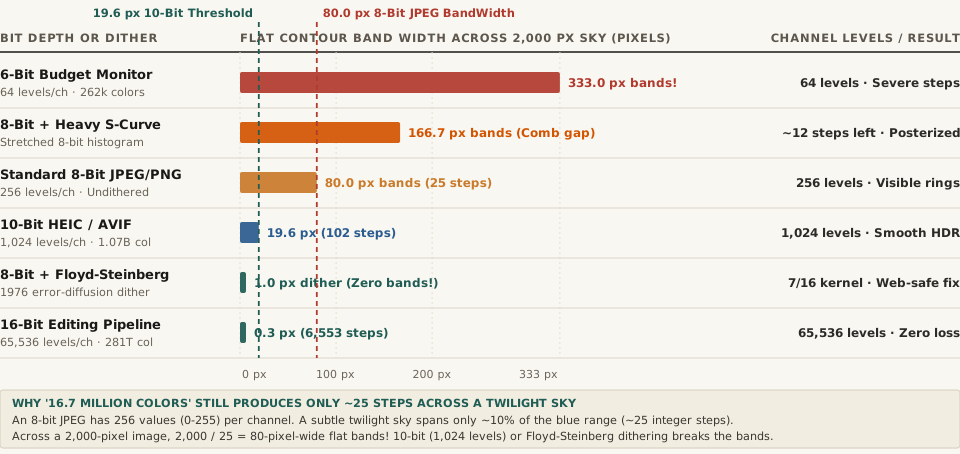
2,000-pixel sky gradient covering 10% of tonal range) across 6-bit, 8-bit, 10-bit, dithered 8-bit, and 16-bit pipelines. Source: Wikipedia — Colour Banding & Dither.Why Your Eyes Make Banding Look Worse: Lateral Inhibition and Mach Bands
Why does a jump of just +1 integer unit (from RGB 145 to 146, a luminance change of less than 0.4%) look like a harsh ridge when two 80-pixel stripes meet? The answer is Mach bands, discovered by physicist Ernst Mach in 1865.
Retinal ganglion cells in the human eye use lateral inhibition—acting as a spatial high-pass filter that amplifies sudden step edges between two uniform fields. When two 80-pixel-wide uniform bands sit side by side, your visual cortex artificially darkens the edge of the darker band and brightens the edge of the lighter band, turning a tiny 1/256 digital rounding step into a glaring contour ring.
Color banding is not a lack of total colors in the RGB cube; it is a lack of intermediate integer steps along a single gradient—and the human retina's lateral inhibition amplifies every step edge into a visible Mach band.
How 10-Bit/16-Bit Color and Floyd–Steinberg Dithering Eliminate Banding
Digital imaging pipelines eliminate sky and shadow banding using two complementary techniques—one during capture/editing and one during final 8-bit web export:
- Capture and Edit in 10-Bit (
1,024Levels) or 16-Bit (65,536Levels):- 10-Bit Color (
HEIC,AVIF,ProRes, HDR10): Adding just 2 extra bits per channel quadruples the number of steps per channel from256to1,024(1.07 billiontotal colors), shrinking an 80-pixel band down to19.6 pixelsand dropping the step height below the human eye's Barten contrast sensitivity threshold. - 16-Bit Editing Space (
TIFF,PSD, Raw): Provides65,536integer levels per channel (281.47 trillioncolors)—256 times finer than 8-bit—so heavy tone curves, gradients, and radial vignettes never tear gaps in the histogram.
- 10-Bit Color (
- Apply Dithering (Noise or Floyd–Steinberg Error Diffusion) When Exporting to 8-Bit:
- How do you deliver a band-free 8-bit JPEG, PNG, or WebP for the web when the output file is still limited to
0–255integers? You apply dithering before rounding from 16-bit down to 8-bit. - Floyd–Steinberg Error Diffusion (1976): Published by Robert W. Floyd and Louis Steinberg in
1976, this algorithm rounds each pixel to its nearest available integer value and pushes the leftover fractional rounding error ($e$) onto four neighboring unvisited pixels using the exact weights7/16right,3/16bottom-left,5/16bottom, and1/16bottom-right. - Triangular PDF (TPDF) /
0.5-LSBNoise Dither: Alternatively, adding a microscopic±0.5to±1.0 LSBdither pattern randomizes the 80-pixel boundary so adjacent values (145and146) interleave at the 1-pixel level—completely defeating the eye's Mach-band edge detector!
- How do you deliver a band-free 8-bit JPEG, PNG, or WebP for the web when the output file is still limited to
Complete Comparison of Bit Depths, Quantization Steps & Dithering Methods
The table below compares per-channel integer precision, total RGB colors, flat band widths across a 2,000-pixel sky gradient, and visual banding severity (full dataset in color-banding-bit-depth-quantization-steps-and-dithering-methods.csv):
| Bit Depth or Dithering Pipeline | Levels / Channel | Total RGB Colors | Steps in 10% Sky | Band Width (2,000px Sky) |
Banding Severity & Best Use |
|---|---|---|---|---|---|
| 6-Bit Budget Display Panel | 64 (2^6) |
262,144 |
~6 steps |
333.0 px per band |
Severe stair-stepping on budget monitors |
| 8-Bit + Heavy S-Curve Edit | 256 (Stretched) |
16.77M (Comb gaps) |
~12 steps |
166.7 px per band |
Strong posterization from editing 8-bit files |
| Standard 8-Bit JPEG / PNG | 256 (2^8) |
16.77 million |
~25 steps |
80.0 px per band |
Visible Mach bands in smooth sky gradients |
| 10-Bit HEIC / AVIF / HDR | 1,024 (2^10) |
1.07 billion |
~102 steps |
19.6 px per band |
Near-invisible; standard on modern phones |
| 8-Bit + Floyd–Steinberg / Dither | 256 + Dither |
16.77M (Dithered) |
Continuous ramp | 1.0 px micro-dither |
Zero banding; ideal 8-bit web export fix |
| 16-Bit Working Space (TIFF/Raw) | 65,536 (2^16) |
281.47 trillion |
~6,553 steps |
0.3 px (Sub-pixel) |
Zero banding; gold-standard editing space |
Resizing and exporting batches of sunset, portrait, or product photos for the web? Plan multi-slide carousels in BatchPad with clean tonal preservation.