
What Is CRI in Lighting? Why R9 Red Rendering Matters on Camera
What Is CRI in Lighting? Why R9 Red Rendering Matters on Camera
Standard CRI measures only 8 pastel colors (R1–R8) and ignores saturated red (R9)—explaining why a 90 CRI office bulb can still make human skin look gray and sickly on a webcam unless R9 exceeds 80.
Anyone who has purchased an LED desk lamp or ring light for remote work has encountered the specification CRI (Color Rendering Index) printed prominently on the box. Lighting manufacturers routinely advertise "90+ CRI" as a guarantee of natural, flattering color. Yet when you turn on a hardware-store 90 CRI bulb in front of a laptop webcam or mirrorless camera, human skin often looks chalky, slightly greenish, or strangely drained of life.
The culprit is a 60-year-old mathematical loophole in how the International Commission on Illumination (CIE) calculates CRI. The headline number printed on retail packaging completely excludes saturated red—the exact spectral band that governs human complexion.
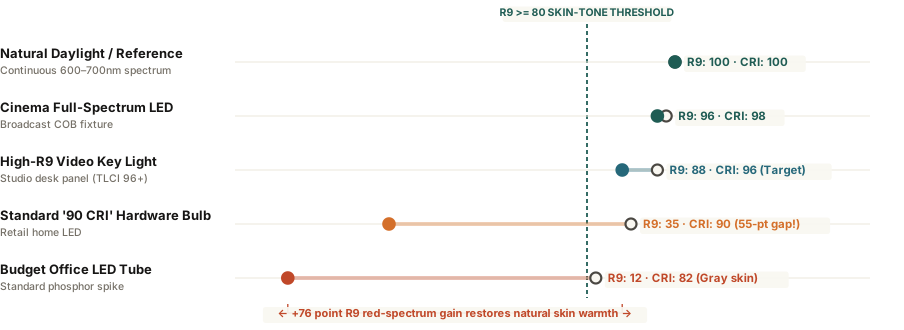
How Standard CRI (Ra) Hides Red-Spectrum Dropouts
Defined under specification CIE 13.3, the Color Rendering Index evaluates how accurately a light source reproduces color swatches compared to a reference blackbody radiator (such as incandescent tungsten below 5,000K or natural daylight above 5,000K). However, the full test suite contains 15 color samples (R1 through R15), while the official "General CRI" (known as Ra) averages only the first eight samples: R1 through R8.
All eight of those R1–R8 test patches are muted, low-saturation pastel tones (dusty rose, mustard yellow, sage green, and pale lavender). The six extended patches—including R9 (saturated strong red), R12 (saturated blue), and R13 (Caucasian skin tone)—are omitted from the average. Because standard white LEDs generate light by firing a narrow 450nm blue diode through a yellow phosphor coating, their spectrum naturally drops off sharply above 620nm in the deep red wavelengths.
A budget LED bulb can score 90 on the eight pastel swatches of standard CRI while scoring below 35 on R9 saturated red—starving the camera sensor of skin-tone warmth.
Why Webcams Need R9 Above 80 for Healthy Skin Tones
The visual appearance of human skin across all ethnicities is governed by two biological pigments: epidermal melanin and subdermal oxygenated hemoglobin. Hemoglobin strongly reflects red light between 620nm and 680nm. When your key light lacks energy in the R9 band, three problems compound on video calls:
- Hemoglobin Desaturation: Without 620–680nm red photons to bounce off subdermal capillaries, lips, cheeks, and warm undertones appear flat and gray.
- Bayer Sensor Green Bias: Digital CMOS webcam sensors use a Bayer color filter array with twice as many green pixels as red or blue pixels (RGGB). When red wavelengths are weak, the camera's auto-exposure and auto-white-balance algorithms amplify the green channel, creating a sickly cyan-green cast.
- TLCI (Television Lighting Consistency Index): Unlike CRI, which models human eye adaptation, the EBU's TLCI metric (0–100) directly models how a digital camera sensor responds to a light's spectral power distribution. A TLCI score above 90 (paired with CRI 95+ and R9 > 80) requires virtually zero post-processing color correction.
When selecting a key light for video conferencing, check the manufacturer's photometric spec sheet for an explicit R9 >= 80 and TLCI >= 90 rating rather than relying on a generic 90 CRI badge. You can Calibrate video call lighting in Lumet to turn your monitor into a color-balanced studio fill light that complements high-CRI fixtures.