
What Is EXIF Metadata in Photos, and Which GPS and Camera Details Are Safe to Strip Before Sharing?
Every JPEG or HEIC image captured on a smartphone or camera carries a hidden header block called EXIF (Exchangeable Image File Format). Built on TIFF Image File Directories (IFDs) and standardized under EXIF 3.0 (CIPA DC-008-2024), those headers record everything from shutter speed and ISO to exact GPS latitude, longitude, and device serial numbers.
As documented in the ExifTool TagNames specification, FastPictureViewer color-management notes, and CEUR-WS EXIF privacy research, stripping metadata blindly can break how your image looks online—rotating vertical portraits sideways or washing out wide-gamut colors. Strip GPS and privacy tags safely in BatchPad while keeping your orientation and color profiles intact.
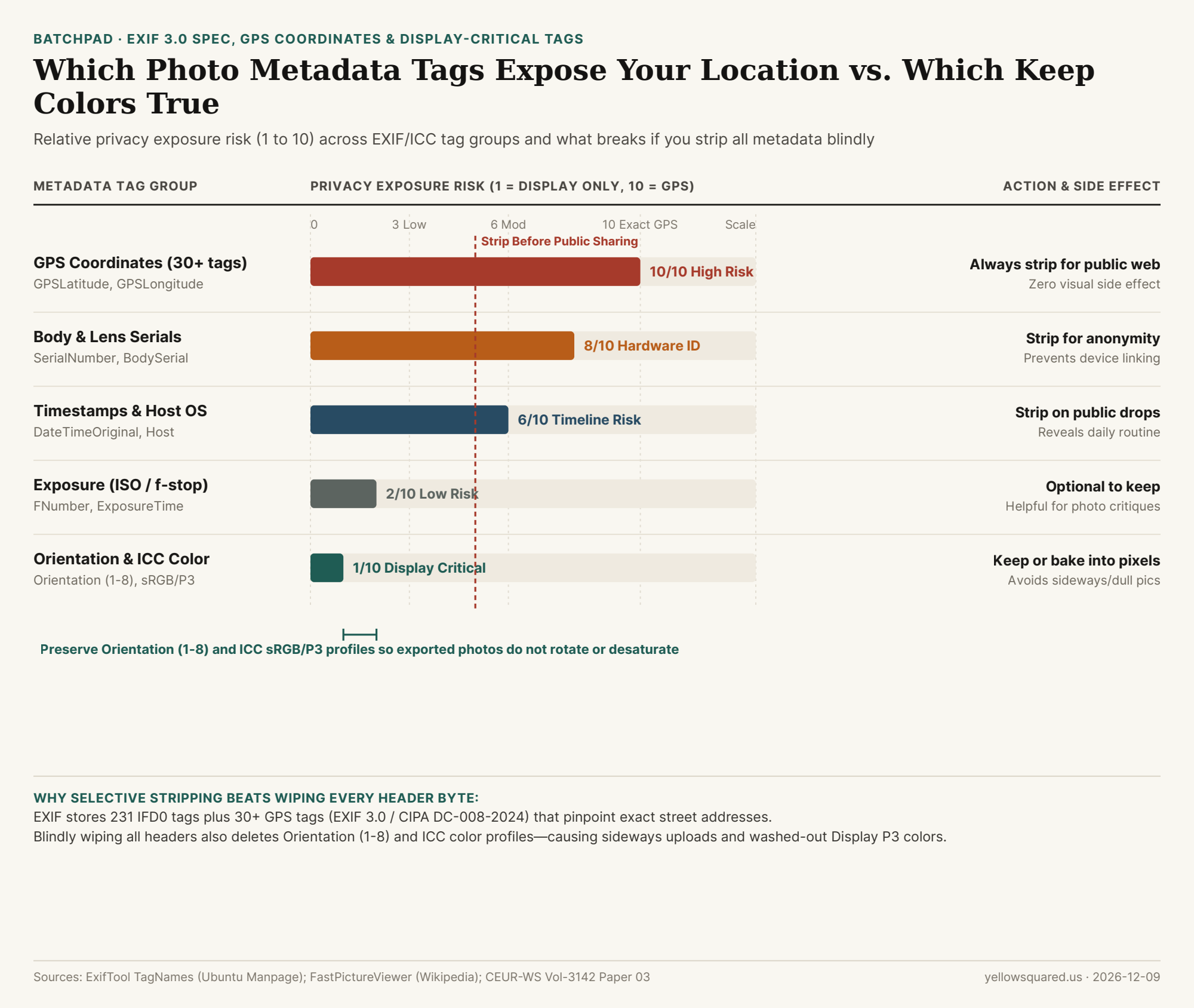
High-Risk Tags You Should Always Strip Before Public Sharing
- GPS Coordinates (30+ tags): Fields such as
GPSLatitude,GPSLongitude,GPSAltitude, andGPSImgDirectioncan pinpoint a home, school, or workplace within a few meters—even if you cropped the photo. - Hardware Serial Numbers: Tags like
SerialNumberandLensSerialNumberin camera maker-notes can link separate anonymous uploads back to the exact same camera body. - Timestamps & Host Computer Names:
DateTimeOriginal, timezone offsets, and editing-software tags reveal when you were away from home and which device exported the file.
"Safe metadata hygiene is selective: strip GPS coordinates, serial numbers, and timestamps, but bake or preserve Orientation (1–8) and ICC color profiles so your photo does not rotate sideways or turn dull."
Display-Critical Tags You Should Preserve (or Bake In)
Among the 231 standard IFD0 tags, two non-identifying groups control how browsers render pixels:
- EXIF
Orientation(values1through8): Phones save sensor pixels in one fixed orientation and rely on theOrientationflag to tell viewers to rotate 90° or 270°. Wiping it without rotating the actual pixel grid flips portrait shots sideways. ICC_Profile(sRGB/Display P3): Removing aDisplay P3profile without converting the color space forces browsers to interpret wide-gamut values as narrowersRGB, making reds and greens look flat and washed out.
EXIF Tag Group Privacy & Display Reference Table
Use this checklist before uploading photos to marketplaces, forums, or public blogs (download the raw CSV dataset):
| Metadata Group | Key Tag Names | Privacy Risk | Public Web Action | If Removed Blindly |
|---|---|---|---|---|
| GPS Location | GPSLatitude, GPSLongitude |
10 / 10 | Always strip | Zero visual impact; removes map pin |
| Device Serials | SerialNumber, LensSerial |
8 / 10 | Always strip | Zero visual impact; stops fingerprinting |
| Timestamps & OS | DateTimeOriginal, Host |
6 / 10 | Strip for anonymity | Removes capture timeline context |
| Exposure Data | FNumber, ISOSpeedRatings |
2 / 10 | Optional (keep for forums) | Hides lens/shutter learning settings |
| Orientation & ICC | Orientation, ICC_Profile |
1 / 10 | Preserve or bake in | Sideways portraits & washed-out colors |