
What Is UGR 19 in Lighting? How to Stop Overhead Light Glare on Your Monitor
What Is UGR 19 in Lighting? How to Stop Overhead Light Glare on Your Monitor
Unified Glare Rating (UGR) measures the logarithmic contrast between a light fixture's surface luminance (L) and your room's background brightness (Lb)—explaining why EN 12464-1 mandates UGR 19 or lower for computer workspaces.
You can buy a high-end 4K matte display, set your desk height to the millimeter, and install bright overhead LED panels that deliver the textbook 500 lux of desktop illumination—and still finish every workday with dry, aching eyes and a tension headache. When you lean back in your chair, you notice a milky haze washing out dark code editors or spreadsheets on your monitor, and you subconsciously squint whenever you look up from the keyboard.
The culprit is not how much light reaches your desk (`illuminance`, measured in `lux`), but how aggressively the light source shines into your eyes and screen at high viewing angles (`discomfort glare` and `veiling reflections`). In architectural photometry and the European workplace lighting standard EN 12464-1, that glare is governed by a single metric: the Unified Glare Rating (`UGR ≤ 19`).
The CIE 117 Formula: Why UGR Is a Room Ratio, Not Just a Bulb Spec
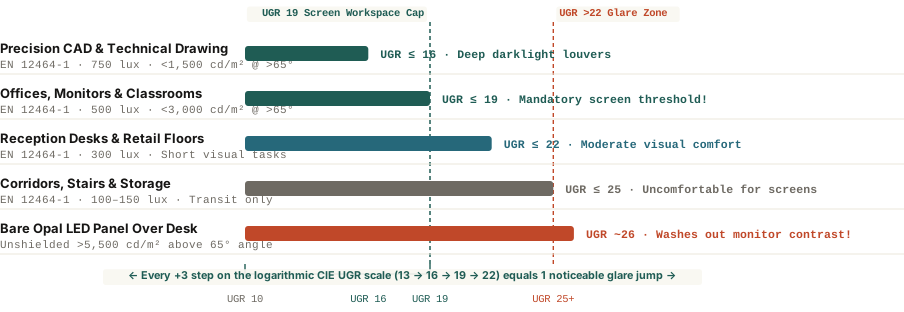
Defined by the International Commission on Illumination in CIE Publication 117, the Unified Glare Rating (`UGR`) runs on a logarithmic scale from 10 (imperceptible glare) to 28 (unbearable glare), stepping in increments of 3 (`10, 13, 16, 19, 22, 25, 28`) where each 3-point step represents one noticeable jump in human visual discomfort:
`UGR = 8 × log10 [ (0.25 ÷ Lb) × Σ (L² × ω ÷ p²) ]`
Look closely at the four variables inside that equation and you immediately see why a light fixture alone cannot guarantee low glare:
- `L` (Luminaire Surface Luminance in `cd/m²`): The brightness of the light-emitting surface along the line of sight to the observer's eye (squared in the numerator!).
- `Lb` (Background Luminance in `cd/m²`): The ambient brightness of the walls and ceiling behind your monitor (in the denominator!). If you sit under a bright downlight in a dark cave-like room with unlit walls (`low Lb`), your `UGR` skyrockets.
- `ω` (Solid Angle in steradians) & `p` (Guth Position Index): How large the fixture appears and how close it sits to your horizontal line of sight.
Lux measures the light landing on your desk; UGR measures the contrast shock hitting your retina when you look at your screen.
How to Bring Your Home or Office Workspace Below UGR 19
Under EN 12464-1, any room where people read, write, or work on display screens requires `UGR ≤ 19` (and `UGR ≤ 16` for precision CAD or technical drawing) paired with a high-angle luminaire luminance cap of `<3,000 cd/m²` at viewing angles above `65°` from downward vertical. Use three practical adjustments to eliminate glare in any workspace:
- Replace Bare Opal Diffusers With Microprismatic or Louvered Optics: Cheap flat opal LED panels scatter light across a wide `110°–120°` beam (`>5,500 cd/m²` above `65°`, `UGR 23–26`). Microprismatic lenses or recessed darklight louvers (`30°–35°+` shielding cutoff) direct light downward onto the desk while keeping high-angle rays out of your eyes and screen.
- Raise Background Luminance (`Lb`) With a Monitor Bias Light: Because `Lb` sits in the denominator of the CIE formula, placing a `6500K` LED bias strip behind your monitor (or bouncing an indirect lamp off the ceiling and wall behind your desk) cuts the contrast ratio and immediately reduces eye fatigue.
- Align Your Desk Parallel to Overhead Fixtures and Windows: Never place your monitor directly underneath and in front of an overhead fixture (where the reflection angle equals the incidence angle into your eyes); sit with your line of sight parallel to window walls and luminaire rows.
To check whether your desk hits the 500-lux workplace target without exceeding comfort contrast ratios, you can Measure workspace lux and glare in Lumet directly from your device.