
What Is 'Phantom Award Availability'? How to Verify Partner Airline Seats Before Transferring Points
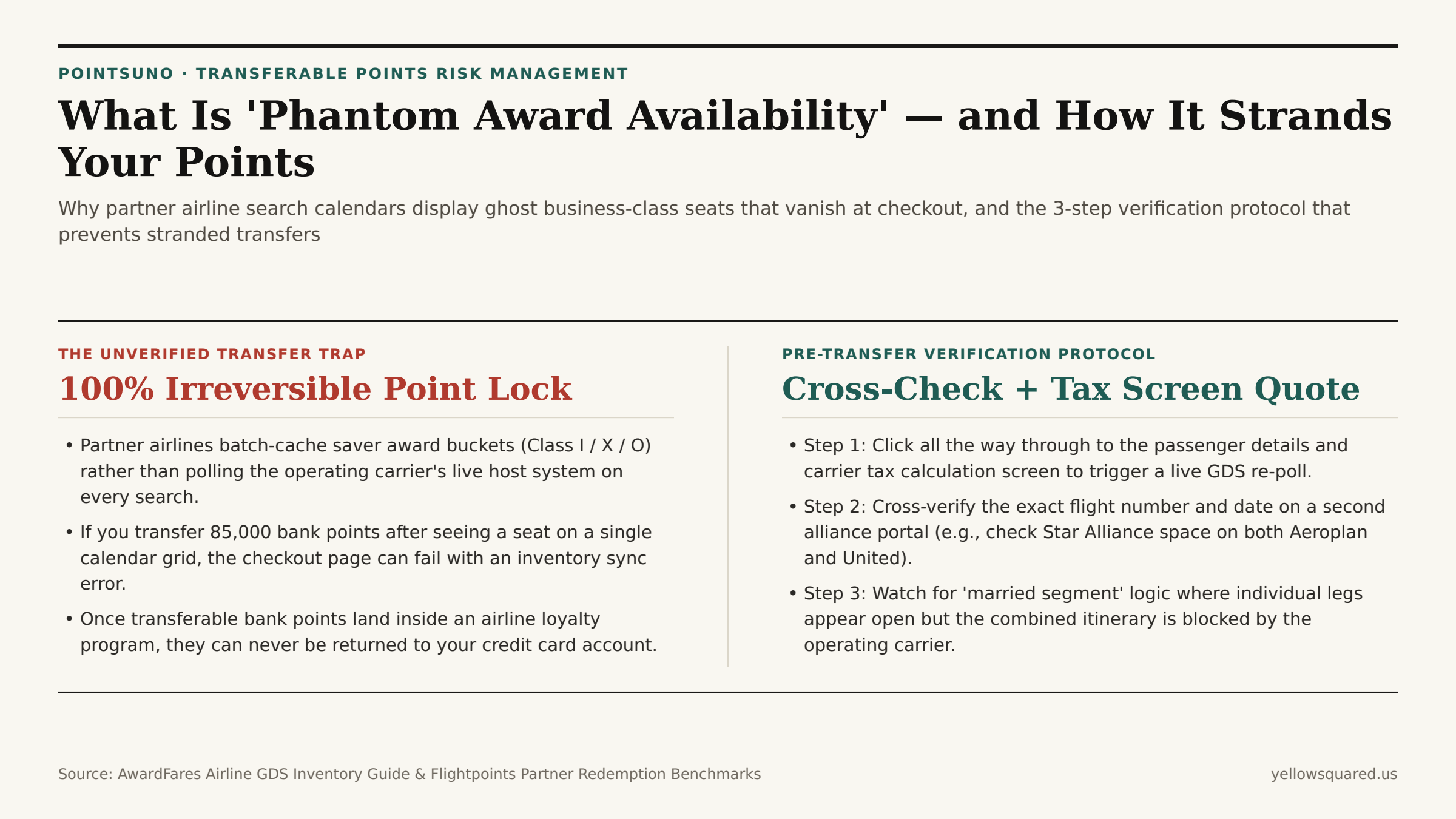
You spot two saver business-class seats to Tokyo on a partner airline's search calendar for 75,000 points each, instantly transfer 150,000 credit card points from your bank portal, click through to book — and hit a red error banner stating the seats are no longer available. In award travel, this failure mode is called phantom award availability: ghost inventory that appears bookable on a partner search calendar because of stale cache tables, but vanishes the moment the ticketing system polls the operating airline's live reservation host.
Because point transfers from major bank programs (Chase Ultimate Rewards, American Express Membership Rewards, Bilt Rewards, Capital One Miles, and Citi ThankYou Points) are 100% irreversible once executed, a single phantom seat encounter can strand six figures of hard-earned points inside a foreign frequent-flyer program with strict expiration rules. As documented in the AwardFares Airline GDS Inventory & Phantom Availability Technical Guide and Flightpoints' Partner Award Space Analysis, understanding how airlines sync partner buckets allows you to eliminate phantom risk before moving a single point. Before initiating your next transfer, Compare transfer partner valuations in Pointsuno to verify alternative partner routes and net cents-per-point yields.
Why Airline Reservation Systems Display Ghost Award Seats
Every time you search for a partner flight — such as looking up Lufthansa or ANA business class (Fare Class I) on Air Canada Aeroplan, or searching British Airways and Qatar Airways on American Airlines — the website you are using does not query the operating airline's master Passenger Service System (such as Amadeus Altea or Sabre) in real time for every date on a 30-day calendar. Live Global Distribution System (GDS) queries cost money per transaction and add latency. Instead, partner airlines rely on cached availability tables updated via periodic batch pushes (AVS / Availability Status messages).
Phantom availability emerges from three specific synchronization gaps:
- Stale Cache Latency: When another traveler books the last saver award seat directly on the operating carrier, the partner portal's cached calendar grid may continue showing
2 seats leftfor several hours until the next batch refresh or until a user clicks all the way through to checkout. - Married-Segment Control Logic: An operating airline may show saver space on Hub A to Hub B (
FRA–TYO) when searched alone, but block that exact seat when combined with a domestic feeder flight (BER–FRA–TYO), causing the itinerary to fail at the final fare-construction step. - Partner Quota Desynchronization: Certain airlines release different sub-buckets to their own members than to alliance partners; if a partner search engine misreads a domestic member bucket as alliance-eligible
Class Ispace, the host CRS rejects the booking request at ticketing.
The 3-Step Pre-Transfer Verification Protocol
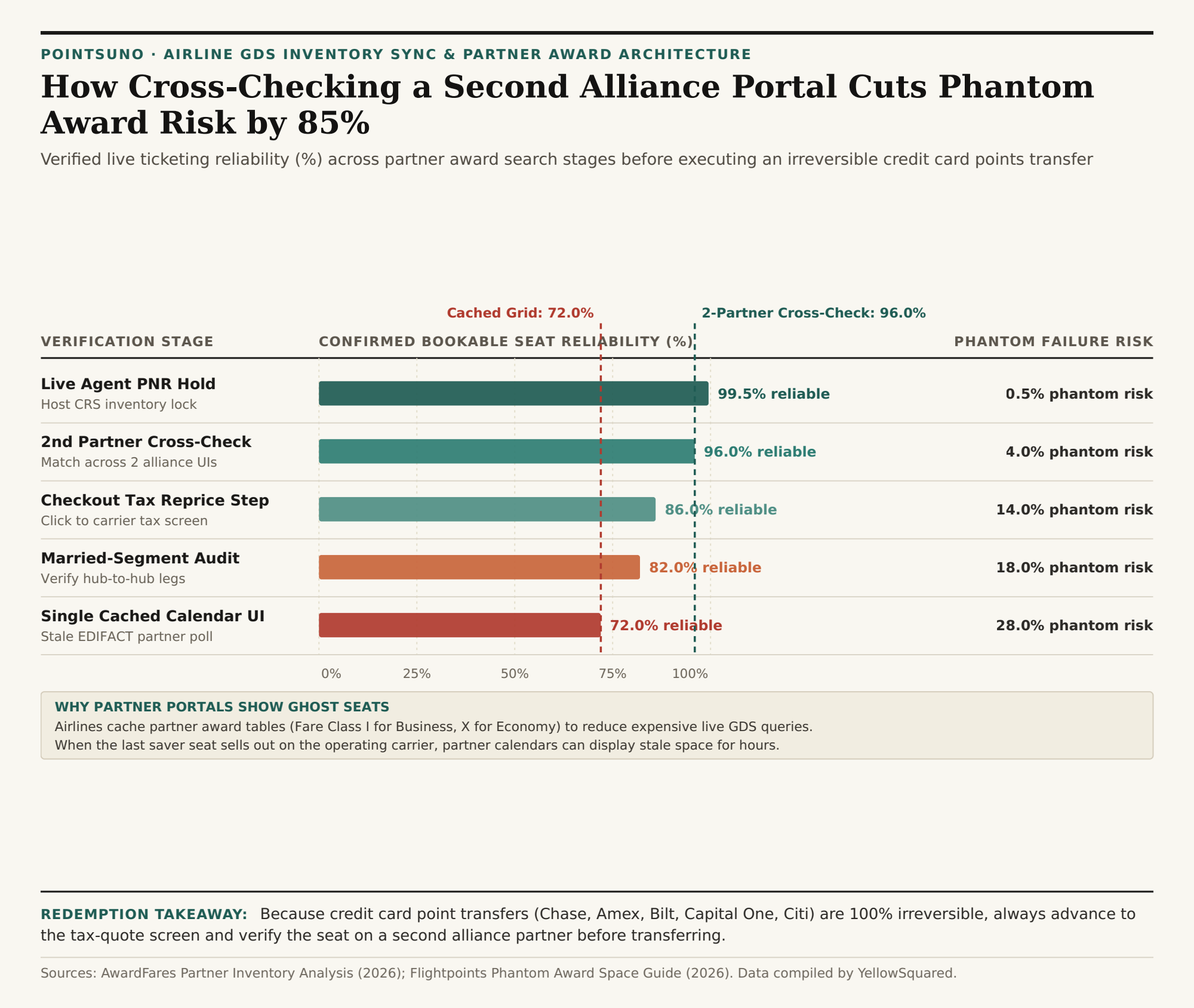
As detailed across both AwardFares and Flightpoints, running a 90-second preflight check raises booking reliability from roughly 72.0% on a raw calendar grid to 96.0%–99.5%:
- Advance Past the Calendar to the Passenger & Tax Calculation Screen: Never trust the first search results row. Click the specific flight and proceed to the passenger-entry or carrier-tax breakdown screen; this step forces most portals to issue a live "Long Sell" availability check against the operating airline's host database.
- Cross-Check on a Second Alliance Partner Portal: True alliance saver space (
Iin Business,Xin Economy,Oin First) is visible across multiple alliance partners simultaneously. For Star Alliance flights, confirm the exact flight number appears on both Air Canada Aeroplan and United MileagePlus. For Oneworld flights, cross-check across American Airlines, British Airways Executive Club, and Alaska Airlines. For SkyTeam (such as Air France/KLM Flying Blue), cross-check on Delta or Virgin Atlantic. - Call to Confirm or Place a Courtesy PNR Hold on High-Value Transfers: Whenever transferring 100,000+ points for multiple long-haul seats, calling the ticketing airline's desk to verify live host inventory (or requesting a temporary PNR hold where supported) locks the seat before your points leave the bank.
"If a partner award seat appears on one airline's calendar grid but is completely missing from every other partner in the same alliance, treat it as phantom space until a live checkout tax quote or phone agent confirms the host bucket."
| Verification Stage | Inventory Sync Mechanism | Bookable Reliability | Phantom Risk | Recommended Pre-Transfer Action |
|---|---|---|---|---|
| Single Portal Calendar Grid | Cached partner AVS table | 72.0% | 28.0% | Never transfer bank points from grid view alone |
| Married-Segment Leg Audit | Hub-to-hub vs. feeder check | 82.0% | 18.0% | Test gateway-to-gateway segment independently |
| Checkout Tax Reprice Screen | Live GDS fare & tax poll | 86.0% | 14.0% | Advance to passenger/tax screen before transferring |
| 2nd Alliance Partner Check | Independent dual-portal poll | 96.0% | 4.0% | Confirm identical Class I/X space on 2nd partner |
| Live Agent PNR Confirmation | Direct host CRS seat check | 99.5% | 0.5% | Verify or hold PNR on 100k+ point transfers |
Modeling Backup Redemption Paths Before You Transfer
Even when space is verified, fast-moving saver seats can be snapped up while a bank transfer is processing. Before moving points, always check whether your target loyalty program offers a secondary route or partner airline on the same corridor so your transferred balance always has a high-value redemption outlet. To compare transfer ratios, partner overlap, and net cents-per-point returns across all major bank currencies, Compare transfer partner valuations in Pointsuno and download the phantom award verification CSV dataset.