
What Is the Difference Between JPEG, PNG, WebP, and AVIF for Web Image Size and Transparency?
For nearly two decades of web publishing, designers and photographers were trapped in a two-format compromise: if you needed a compact photograph, you exported a JPEG (which has zero support for transparent backgrounds); if you needed a transparent product cutout, UI icon, or drop shadow, you had to export a lossless PNG (which bloats photographic file sizes by 2.5× to 4×). As documented in technical specifications for WebP (RFC 9649), AVIF (AV1 Image File Format), and modern raster delivery formats, next-generation video-keyframe codecs broke that trade-off by combining predictive lossy/lossless compression with full alpha-channel transparency.
When you are batch-exporting images for an online store, portfolio, or blog, when should you pick JPEG, PNG, WebP, or AVIF? Batch-convert and optimize JPEG, PNG, and WebP images in BatchPad to resize and compress entire folders offline in seconds.
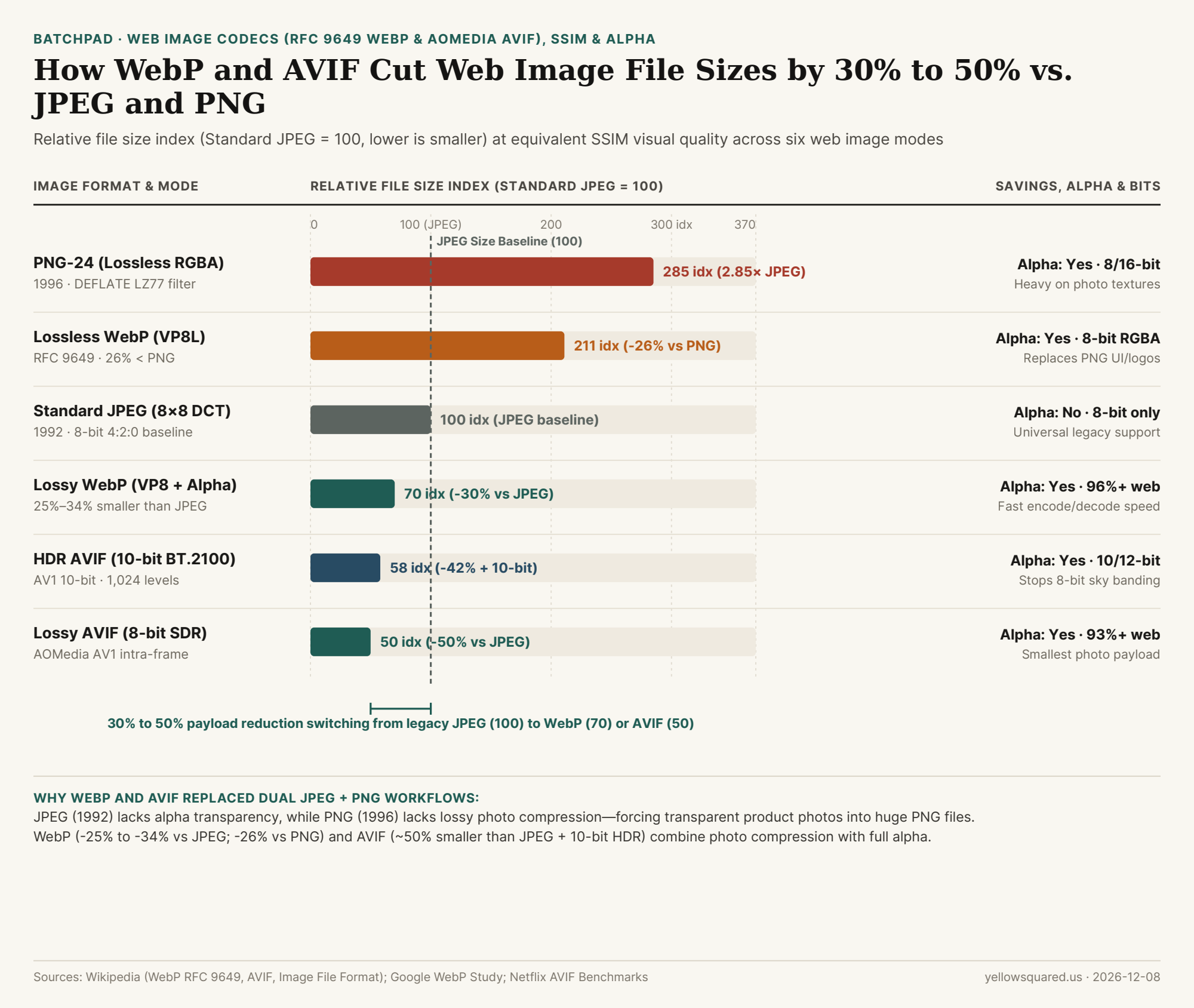
Standard JPEG = 100, lower is smaller) at equivalent Structural Similarity (SSIM) visual quality across six web image modes. Sources: WebP (RFC 9649), AVIF, and HEIF/AV1 Benchmarks · Download CSV dataset.How Video Keyframe Prediction Beat 1990s Image Codecs
The compression leap from JPEG and PNG to WebP and AVIF comes directly from modern video codecs (VP8 and AV1), which compress a still image the same way they compress an intra-coded video keyframe (I-frame):
- JPEG (
1992,8×8 DCT): Splits an image into rigid8×8pixel blocks in 8-bitYCbCr(usually4:2:0chroma subsampling) and applies a Discrete Cosine Transform. It has no alpha channel, no lossless mode in standard browsers, and shows blocky ringing artifacts at high compression. - PNG (
1996,DEFLATE LZ77 + Huffman): Applies scanline delta prediction filters followed by losslessDEFLATEcompression. It preserves pixel-exact 8-bit or 16-bitRGBAgraphics and crisp text, but struggles on noisy camera photographs, producing files roughly285%the size of an equivalent JPEG. - WebP (
2010, standardized asIETF RFC 9649in November 2024): UsesVP8block-based intra-prediction for lossy photos and a dedicatedVP8Lspatial-transform engine for lossless graphics. According to Google's benchmark studies, lossy WebP files are25% to 34%smaller than JPEG at equalSSIMquality, while lossless WebP files are26% to 28%smaller than recompressed PNGs (and45%smaller than unoptimized web PNGs)—and both modes support an 8-bit alpha transparency channel at just a~22%byte overhead over lossy RGB! - AVIF (
2019,AV1inside an ISO HEIF container): Developed by the Alliance for Open Media (AOMedia), AVIF uses variable block sizes up to64×64, directional intra-prediction, and non-linear loop filtering. As noted in Netflix's 2020 AVIF evaluations, AVIF achieves roughly50%file-size savings vs. JPEG while supporting 8-bit, 10-bit, and 12-bit color depth,4:4:4chroma, HDR (PQ/HLG), and full alpha transparency.
"A transparent product cutout saved as a lossless PNG often weighs 600 KB; exported as a lossy WebP or AVIF with an alpha channel, that same transparent cutout drops under 90 KB—an 85% payload reduction with no visible halo."
Head-to-Head Codec Comparison Table
The table below compares relative payload size, transparency support, color depth, and browser compatibility across all six delivery modes (download the raw CSV table):
| Format & Compression Mode | Codec & Standard | Relative Size (JPEG = 100) |
Savings vs. Baseline | Alpha Transparency | Max Bit Depth & Chroma | Best Production Use Case |
|---|---|---|---|---|---|---|
| PNG-24 + Alpha (Lossless) | 1996 DEFLATE (LZ77) |
285 (2.85× JPEG) |
Lossless UI baseline | Yes (8/16-bit RGBA) | 8-bit or 16-bit RGB | Pixel-exact source archives, UI icons & line art |
Lossless WebP (VP8L) |
RFC 9649 (VP8L) |
211 |
-26% vs. PNG (-45% raw) |
Yes (8-bit RGBA) | 8-bit RGBA only | Drop-in web replacement for transparent PNGs |
| Standard JPEG (Lossy) | 1992 ISO 8×8 DCT |
100 (Baseline) |
0% reference |
No (Opaque only) | 8-bit 4:2:0 / 4:4:4 |
Universal email, print kiosks & legacy devices |
| Lossy WebP + Alpha | RFC 9649 (VP8 Intra) |
70 |
-25% to -34% vs. JPEG |
Yes (Lossy RGB + Alpha) | 8-bit 4:2:0 YUV |
Fast-encoding everyday web photos & cutouts (96%+ support) |
| HDR AVIF (10-Bit) | AOMedia AV1 High |
58 |
-42% vs. JPEG + HDR |
Yes (10-bit Alpha) | 10/12-bit BT.2100 |
Wide-gamut HDR photos & smooth sky gradients |
| Lossy AVIF (8-Bit SDR) | AOMedia AV1 Baseline |
50 |
~50% vs. JPEG |
Yes (AV1 Alpha plane) | 8/10/12-bit (4:2:0/4:4:4) |
Maximum bandwidth savings on modern browsers (93%+) |
When to Pick WebP vs. AVIF vs. PNG in Your Batch Workflow
As noted in WebP's format analysis, lossy WebP is limited to 8-bit 4:2:0 chroma subsampling (which can slightly soften 1-pixel colored UI text), whereas lossless WebP preserves full RGBA sharpness at 26% smaller size than PNG, and AVIF supports both 10-bit depth and 4:4:4 chroma at half the file size of JPEG (at the cost of slower CPU encoding times). For fast, universal web delivery, batch-export photographic assets and transparent e-commerce cutouts to WebP (quality 80–85), and keep a JPEG fallback when sending attachments to legacy desktop workflows. Batch-convert and optimize JPEG, PNG, and WebP images in BatchPad to process hundreds of photos right on your device.