
Why Do Glasses Glare on Video Calls and Portraits, and How Do You Light Someone Wearing Glasses?
Clip a circular ring light around your webcam or mount a speedlight directly on top of your camera hot shoe, and anyone wearing prescription glasses immediately loses their eyes behind two glowing white donuts. Dimming the light does not fix the problem—it merely darkens the speaker's face at the exact same rate as the reflection, leaving the specular hotspot intact.
Why do transparent eyeglass lenses behave like mirrors on camera, and why does moving a fill light just twenty inches to the side make the reflection vanish completely? As explained in optical engineering guides on Fresnel's equations at Omega Optical and ZEISS Lenspire's technical monograph on optical reflections, eyeglass glare is governed by two physical laws: Fresnel refractive-index reflection at the air-lens boundary and the geometric Law of Reflection (θ_incident = θ_reflected). When setting up a desk key light or mobile fill screen for a video call or portrait session, you can Dial in warm and daylight key-light presets in Lumet and position the screen outside the lens's specular reflection cone.
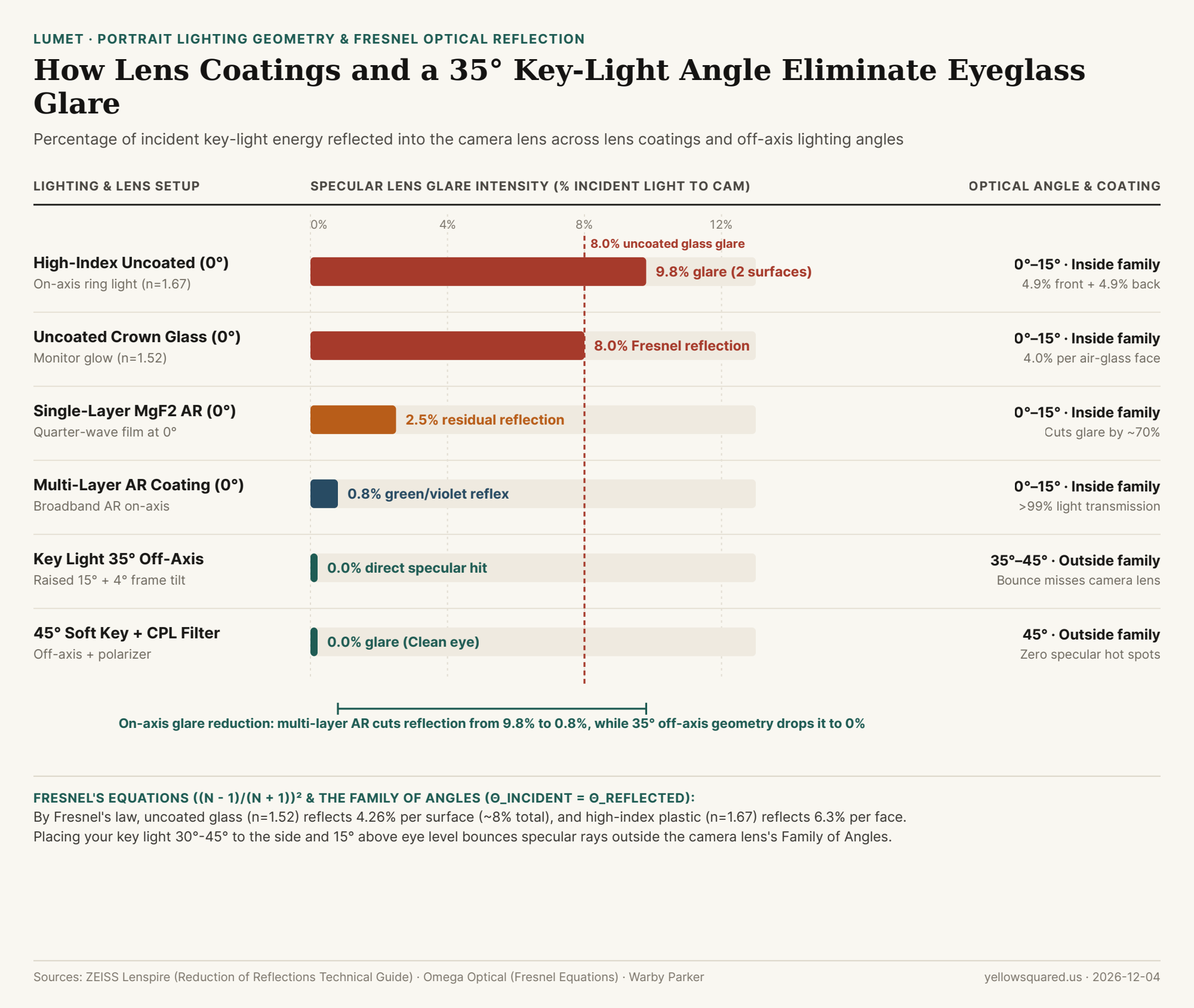
Fresnel's Equation: Why Uncoated High-Index Lenses Reflect Nearly 10% of Your Key Light
Whenever a ray of light travels through air (refractive index n_air = 1.00) and strikes a denser transparent medium like glass or polycarbonate (n_lens = 1.50 to 1.74) at normal (0°) incidence, Augustin-Jean Fresnel's equation dictates the exact fraction of light (R) reflected at a single surface:
R = ((n_lens - 1) / (n_lens + 1))²
Because an eyeglass lens has two air-glass boundaries—the front convex surface facing your light and the rear concave surface facing the eye—every beam of light suffers two separate Fresnel reflections:
- Uncoated Crown Glass or CR-39 Plastic (
n = 1.50–1.52): Each surface reflects((1.52 - 1) / 2.52)² = 4.26%of incident light, totaling~8.0% to 8.3%specular reflection across both faces (leaving only ~92% light transmission). - Uncoated High-Index Prescription Lenses (
n = 1.67 to 1.74): Strong prescriptions use denser high-index materials to keep lenses thin. However, a higher refractive index (n = 1.67) increases single-surface reflection to((1.67 - 1) / 2.67)² = 6.3%(and nearly9.8% to 12%across both surfaces)—making uncoated high-index lenses reflect50% more glarethan standard glass! - Multi-Layer Anti-Reflective (
AR) Coatings (<0.8%reflection): As detailed in Warby Parker's optical coating guide and ZEISS's thin-film interference documentation, vacuum-depositing alternating quarter-wavelength layers (λ / 4) of low- and high-index metal oxides creates destructive interference between the top and bottom of the coating, cutting total specular reflection down to0.5% to 1.0%(usually visible only as a faint emerald-green or violet reflex).
"A ring light mounted around your camera lens guarantees maximum eyeglass glare because its 0-to-10-degree angle of incidence sits dead-center inside the lens's Family of Angles—bouncing 100% of the Fresnel reflection straight back into the camera sensor."
The Family of Angles: How a 35° Lateral Shift + 4° Temple Tilt Clears the Eyes
In studio lighting textbook Light: Science & Magic, the Family of Angles defines the exact cone of positions where a light source produces a direct specular reflection into the camera lens. Because the angle of reflection equals the angle of incidence (θ_i = θ_r), any light placed within 0° to 15° of the camera axis bounces directly back into the lens. To move your light completely outside the Family of Angles without creating harsh nose shadows, apply three small geometric adjustments:
- Move the Key Light
30° to 45°Laterally Off-Axis: Slide your key light (or phone fill screen)30° to 45°to the left or right of the webcam. On a flat lens, a35°incident ray bounces away at35°on the opposite side, missing the camera lens entirely. (Note: because nearsighted minus lenses have a concave rear surface and convex front surface, avoid pushing past45°or the curved edge of the lens may catch the light.) - Raise the Light
15° to 20°Above Eye Level: Raising the light slightly above the subject's eyes bounces the specular ray downward toward the desk or chest rather than horizontally into the camera. - The 4-Degree Temple-Arm Trick (Pantoscopic Tilt): If a curved lens still catches the edge of a large softbox, ask the subject to raise the temple arms of their glasses by just
3 to 5 millimeterson their ears. That imperceptible4°downward tilt of the lens face redirects the reflected beam8°lower (2 × 4°), dropping the white square completely off the glasses.
| Lighting & Eyeglass Configuration | Lens Index (n) | Light Angle to Camera | Reflected Glare to Camera | Result on Video Call or Portrait |
|---|---|---|---|---|
| High-Index Uncoated + On-Axis Ring Light | 1.67 |
0° – 10° (On-axis) |
~9.8% (Both faces) |
Blinding white circle obscures pupils completely |
| Standard Uncoated Glass + Monitor Glow | 1.52 |
0° – 15° (On-axis) |
~8.0% (4.0% × 2) |
Bright rectangular screen reflection over eyes |
Single-Layer MgF2 AR Coating (On-Axis) |
1.52 |
0° – 15° (On-axis) |
~2.5% |
Cuts glare by ~70% but leaves visible hotspot |
| Multi-Layer Broadband AR Coating (On-Axis) | 1.60 |
0° – 15° (On-axis) |
~0.8% |
Faint green or violet tint; >99% transmission |
Key Light at 35° Side + 15° Up + 4° Tilt |
Any | 35° – 45° (Off-axis) |
~0.0% – 0.1% |
Specular ray misses camera; clean iris catchlight |
45° Soft Key Light + Circular Polarizer |
Any | 45° (Off-axis) |
<0.05% |
Zero lens glare with soft facial wrap |
How to Set Up Your Desk Fill Light in 30 Seconds
If you wear glasses on daily video calls, dim your primary computer monitor slightly (or switch apps to dark mode so a giant white browser window at 0° does not reflect in your lenses), place your phone or tablet on a stand 35° to the left or right of your webcam and slightly above eye level, and Dial in warm and daylight key-light presets in Lumet to illuminate your face cleanly with zero eyeglass glare.