
Why Do LED Lights Flicker or Band on Camera? PWM Dimming, 100 Hz/120 Hz Power Grids, and Safe Shutter Speeds
You set up a home studio or sit down at your desk for a video call, turn on your overhead LED lights or a dimmable ring light, and look around the room: to your naked eyes, the illumination is rock-steady. Then you open your webcam or mirrorless camera preview, and ugly dark horizontal bars begin marching up or down your face—or every third frame pulses between bright and dim. Your camera sensor is not broken. As detailed in technical production testing by MediaGear, VShow Lighting, Maxima LED, and ENTTEC, camera banding happens when a CMOS electronic rolling shutter samples an LED light source that is turning on and off at 100 Hz, 120 Hz, or 200–1,000 Hz—fast enough to fool the human brain, but slow enough to catch different rows of your camera sensor in the dark.
Why do LEDs flicker at exactly twice your wall-outlet power frequency, why does dimming an LED light from 100% down to 40% suddenly trigger sharp zebra stripes, and what exact shutter speeds eliminate banding in North America (60 Hz) versus Europe, the UK, and Australia (50 Hz)? Here is the complete electrical and optical guide.
1. Why Your Eyes Don't See It: Critical Flicker Fusion vs. CMOS Rolling Shutters
Unlike an old tungsten incandescent filament—which stays white-hot and continues glowing through the brief zero-voltage crossings of alternating current (AC) thanks to thermal inertia—a light-emitting diode (LED) is a semiconductor junction with virtually zero persistence: the instant current drops, photon emission stops within nanoseconds (ENTTEC).
- The Human Eye Ceiling (
~60 Hzto90 Hz): Human retinal photoreceptors and visual cortex integrate light over a window of roughly 11 to 16 milliseconds. Once a light source flashes faster than the Critical Flicker Fusion (CFF) threshold of60 to 90 Hz, your brain blends the on-off pulses into a continuous, steady glow. - How a Camera's Rolling ShutterSlices Time into Stripes: Almost every consumer webcam, smartphone, and mirrorless camera uses a CMOS rolling shutter (VShow Lighting; Photo-Spectrum readout tests). Instead of exposing the entire sensor at the exact same microsecond (like a global shutter), the camera reads out horizontal rows of pixels sequentially from the top of the frame to the bottom over
8 to 30 milliseconds. If the LED light turns off while rows 400 through 700 are finishing their exposure, those rows receive less light—printing a dark horizontal band across the image!
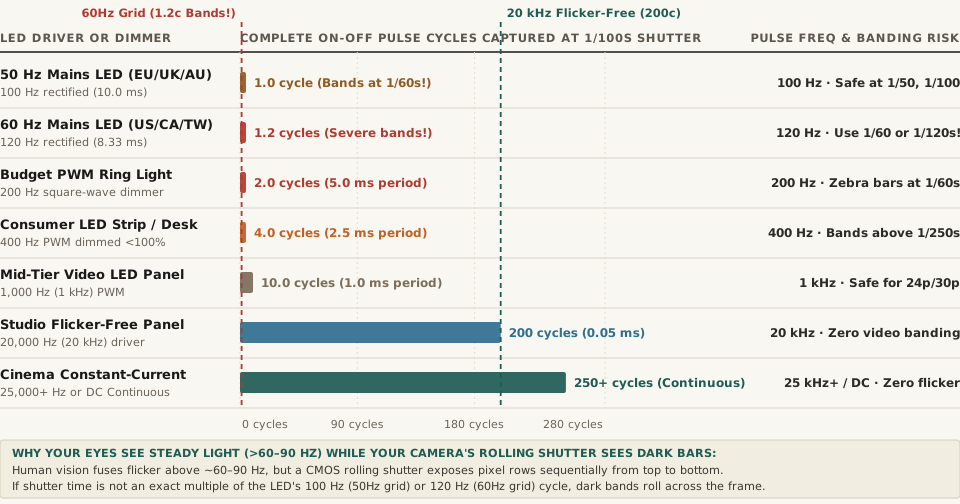
1/100 s exposure across seven driver architectures (MediaGear; VShow Lighting; Maxima LED).2. The Two Electrical Sources of Flicker: 100/120 Hz Mains Ripple vs. PWM Dimming
When you see banding on camera, the flicker comes from one of two electrical mechanisms inside the lamp's driver (Swing Catalyst; VShow Lighting):
100 Hzand120 HzAC Mains Rectified Ripple (Non-Dimmed Bulbs): Wall outlets deliver alternating current that reverses polarity 50 times per second (50 Hzin Europe, the UK, Australia, New Zealand, China, and eastern Japan) or 60 times per second (60 Hzin the United States, Canada, Mexico, Taiwan, South Korea, and western Japan). Inside a budget LED bulb, a bridge rectifier flips the negative half-wave into a positive half-wave, doubling the ripple frequency to2 × 50 = 100 Hz(one pulse every10.0 ms) or2 × 60 = 120 Hz(one pulse every8.33 ms). Without heavy smoothing capacitors, the bulb's brightness rises and falls 100 or 120 times every second.- Pulse-Width Modulation (
PWM) Dimming (Ring Lights, LED Strips & Screens Below100%): How do dimmable LED strips, budget video panels, and monitors lower their brightness without shifting color temperature? Instead of smoothly lowering the DC current (Constant-Current / Analog Dimming), cheap drivers use Pulse-Width Modulation (PWM) (Divoom; OPLED): at100%brightness the LED stays on continuously, but at50%brightness the driver switches the LED 100% ON for half the cycle and 100% OFF for the other half at a fixed frequency (often200 Hzto1,000 Hz). Because the "off" trough drops to zero photons, PWM dimming produces razor-sharp black-and-white zebra bands on fast shutter speeds!
"If the shutter stays open for a whole number of flicker cycles, every frame collects the same amount of light. In 50 Hz regions, Sony recommends a shutter speed of 1/50 s or 1/100 s. In 60 Hz regions it recommends 1/60 s or 1/120 s."
3. How to Fix LED Flicker Immediately: The Whole-Cycle Shutter Math
Why does changing your camera's shutter speed make rolling bands vanish on the spot? Regardless of which microsecond a sensor row starts its exposure, if the exposure duration (t) equals an exact integer multiple of the light's pulse period (T = 1 / f), every single row integrates the exact same number of bright peaks and dark troughs (MediaGear):
- In
60 HzRegions (US, Canada, Taiwan —120 HzLight Pulse,8.33 msPeriod):- Safe Shutter Speeds:
1/120 s(captures exactly1.0full pulse cycle),1/60 s(2.0full cycles),1/40 s(3.0cycles), or1/30 s(4.0cycles). - Why
1/100 sor1/50 sBands in the US: At1/100 s(10.0 ms), a120 HzUS bulb completes1.20 cycles—meaning some sensor rows catch an extra0.20peak while others catch an extra trough!
- Safe Shutter Speeds:
- In
50 HzRegions (Europe, UK, Australia —100 HzLight Pulse,10.0 msPeriod):- Safe Shutter Speeds:
1/100 s(captures exactly1.0full cycle),1/50 s(2.0full cycles), or1/25 s(4.0cycles). - Shooting
24pCinema in a50 HzCountry: The classic 180-degree shutter rule at24 fpssets shutter speed to1/48 s(20.83 ms), which captures2.083cycles of a100 HzEuropean light and causes slow pulsing flicker. Adjusting shutter speed to1/50 s(a172.8°shutter angle at24p, per Blackmagic Design & MediaGear's 50 Hz table) locks onto exactly2.0cycles and eliminates the flicker.
- Safe Shutter Speeds:
- Crank PWM Lights to
100%Brightness (or Use20–25 kHz+Fixtures): If a dimmable desk lamp or background LED strip still bands at1/60 sor1/120 s, turn its dimmer up to100%full power (where the PWM duty cycle reaches100%continuous DC) and diffuse or move the light physically farther away (Divoom). Professional cinema fixtures eliminate PWM banding by running constant-current drivers or ultrasonic PWM above20,000 to 25,000 Hz(Maxima LED).
4. Complete Data Table: LED Flicker Frequencies & Safe Camera Shutter Speeds
The reproducible table below—matching the companion CSV (led-flicker-on-camera-100hz-120hz-pwm-frequencies-and-safe-shutter-speeds.csv)—lists the pulse periods, cycles per 1/100 s exposure, and safe shutter speeds across seven lighting tiers:
| Lighting or Dimmer Type | Pulse Frequency | Pulse Period (T) |
Cycles in 1/100 s |
Safe Flicker-Free Shutter Speeds | Rolling Shutter Behavior |
|---|---|---|---|---|---|
| 50 Hz Mains LED (EU/UK/AU) | 100 Hz (2×50 Hz) |
10.00 ms |
1.00 cycle |
1/100 s, 1/50 s, 1/25 s (172.8° at 24p) |
Bands if camera is left on NTSC 1/60 s or 1/120 s |
| 60 Hz Mains LED (US/CA/TW) | 120 Hz (2×60 Hz) |
8.33 ms |
1.20 cycles |
1/120 s, 1/60 s, 1/40 s, 1/30 s |
Severe rolling bars if shot at PAL 1/50 s or 1/100 s |
| Budget PWM Ring Light | 200 Hz PWM |
5.00 ms |
2.00 cycles |
1/200 s, 1/100 s, 1/50 s (or 100% power) |
Sharp black zebra stripes when dimmed below 100% |
| Consumer LED Strip / Display | 400 Hz PWM |
2.50 ms |
4.00 cycles |
1/400 s, 1/200 s, 1/100 s, 1/50 s |
Visible banding on still photos above 1/250 s |
| Mid-Tier Bi-Color Panel | 1,000 Hz (1 kHz) |
1.00 ms |
10.0 cycles |
Clean up to ~1/250 s; avoid 1/1000 s+ |
Safe for 24p/30p webcams; bands in slow-mo video |
| Studio Flicker-Free Panel | 20,000 Hz (20 kHz) |
0.05 ms |
200.0 cycles |
All standard photo & video shutter speeds | 200 cycles average out completely per exposure |
| Cinema Constant-Current / 25 kHz+ | 25,000+ Hz or DC |
≤ 0.04 ms |
250+ cycles |
Flicker-free at any shutter speed (up to 1/8000 s) |
Zero ripple for high-fps & silent electronic shutters |
If your desk lamp or ring light causes rolling bands on your webcam whenever you dim it, Calibrate video call lighting in Lumet to use your monitor's high-frequency display backlight as a flicker-free, color-accurate key light.