
Why Do LED Lights Flicker on Camera? Shutter Speed vs. Mains Hz Guide
Why Do LED Lights Flicker on Camera? Shutter Speed vs. Mains Hz Guide
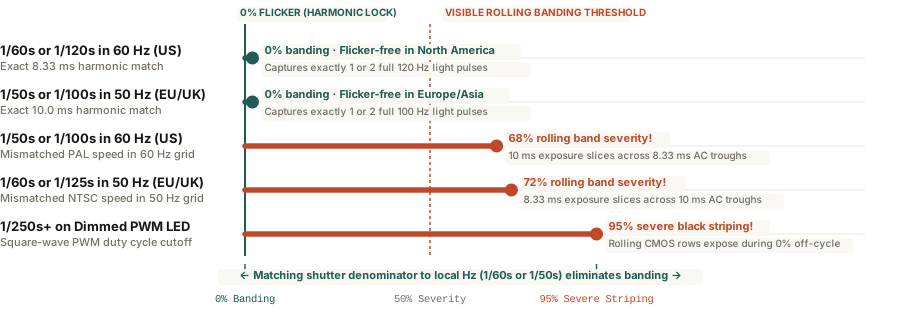
Because AC power alternates at 60 Hz in North America (120 light pulses/sec) and 50 Hz in Europe/Asia (100 pulses/sec), setting your camera shutter speed to an exact harmonic multiple (1/60s or 1/120s for 60 Hz; 1/50s or 1/100s for 50 Hz) eliminates rolling-shutter banding.
Set up a mirrorless camera, smartphone, or webcam in an office lit by overhead LEDs, dial in a cinematic shutter speed, and suddenly dark horizontal bands start marching up or down your video monitor. Look up at the room with your naked eyes, and the lighting appears completely steady. This mismatch between human vision and digital video sensors is one of the most frustrating problems in studio and remote-work lighting—yet its cause is pure electrical frequency math.
Understanding how Alternating Current (AC) utility grids, Pulse Width Modulation (PWM) dimmers, and CMOS rolling shutters interact lets you eliminate LED banding in five seconds without replacing a single fixture.
The Physics: 120 Hz vs. 100 Hz Light Pulses and CMOS Rolling Shutters
Unlike old incandescent tungsten filaments—which stayed glowing hot across AC current reversals due to thermal inertia—Light Emitting Diodes (LEDs) are semiconductor junctions that switch on and off almost instantaneously. When powered by a standard bridge rectifier without heavy capacitor smoothing, an LED pulses twice per Alternating Current sine wave (once on the positive peak and once on the negative peak):
- North America, Taiwan & Western Japan (60 Hz AC Grid): Lights pulse at 120 Hz (one brightness cycle every 8.33 milliseconds).
- Europe, UK, Australia & Most of Asia (50 Hz AC Grid): Lights pulse at 100 Hz (one brightness cycle every 10.00 milliseconds).
Because human critical flicker fusion tops out around 60 to 80 Hz, your brain blends a 100 Hz or 120 Hz pulse into continuous light. A modern CMOS camera sensor, however, uses a rolling shutter that reads pixel rows sequentially from top to bottom over 10 to 16 milliseconds. If a pixel row exposes for `1/100s` (`10.0 ms`) inside a `60 Hz` North American room (`8.33 ms` light cycle), some rows integrate across two bright peaks while adjacent rows integrate across a dark zero-crossing trough—printing dark horizontal stripes across the frame.
Your shutter speed denominator must divide evenly into the local LED pulse frequency: use 1/60s or 1/120s in 60 Hz regions, and 1/50s or 1/100s in 50 Hz regions.
How to Fix AC Flicker and PWM Dimmer Striping
- Lock Shutter Speed to the Grid Harmonic: In North America (`60 Hz`), set your shutter speed to 1/60s or 1/120s (or 1/40s). If you shoot 24 fps with a standard 180-degree shutter (`1/48s` or `1/50s`) in the US under unsmoothed LEDs, switch your shutter to `1/60s` (or `144°` shutter angle) to lock onto the 120 Hz cycle. In Europe or Australia (`50 Hz`), set your shutter to 1/50s or 1/100s.
- Defeat PWM Dimmer Flicker by Running at 100% Brightness: Cheap dimmable LED desk lamps and RGB strips dim by switching the diode completely off and on hundreds of times per second (Pulse Width Modulation). At 30% brightness, the LED is dark 70% of the time. Turning the lamp up to 100% brightness forces a continuous 100% duty cycle, eliminating PWM strobing immediately (you can then reduce intensity by moving the lamp back or adding a diffuser sheet).
To balance your key-light intensity and color temperature without introducing webcam exposure flicker, you can Calibrate video call lighting in Lumet right from your desktop screen.