
Why Do LED Lights Flicker or Show Dark Bands on Camera? (50Hz/60Hz Grids, PWM, and Shutter Speed)
You sit down for an important video call or hit record on a mirrorless camera inside an office, hotel room, or home studio. To your naked eyes, the overhead LED downlights and desk lamp look completely steady. Yet on your webcam preview or camera monitor, dark horizontal shadow bands slowly crawl up or down your face and background wall—or worse, when you raise your shutter speed to 1/250s or 1/500s to shoot a crisp product photo, zebra-striped bars slice across the entire frame.
Why do LED lights that look rock-steady to human vision strobe violently on camera—and why does travelling from the United States (60 Hz AC power) to Europe, the UK, Australia, or parts of Asia (50 Hz AC power) suddenly make a previously flicker-free webcam or mirrorless preset start banding? Here is the exact physics of temporal light modulation (flicker), pulse-width modulation (PWM) dimming, and CMOS rolling-shutter readout—along with a complete lookup table of safe shutter speeds for every power grid and lighting setup.
1. Why Incandescent Bulbs Rarely Banded—and Why LEDs Switch in 10 Nanoseconds
For over a century, traditional tungsten incandescent bulbs ran directly on alternating current (60 Hz in North America and 50 Hz in Europe, Asia, and Australia), where the voltage crosses zero 120 times per second (60 Hz grid) or 100 times per second (50 Hz grid). Why didn't household tungsten lamps carve black stripes across consumer cameras? Because a white-hot tungsten filament operates at roughly 2,700 K (2,427 °C) and possesses substantial thermal inertia: during the 8.3-millisecond or 10-millisecond interval between AC voltage peaks, the glowing metal wire barely cools down at all, keeping its light output modulation depth below 5–10%.
An LED (Light-Emitting Diode), by contrast, is a solid-state semiconductor junction with virtually zero thermal persistence: when forward current drops below the diode's threshold voltage, light emission stops in roughly 10 nanoseconds. Meanwhile, as explained in Wikipedia's psychophysical analysis of light flicker, the human eye's foveal flicker fusion threshold tops out around 60 to 90 Hz under steady gaze (though rapid eye movements, called visual saccades, can leave a “phantom array” trail of dots up to 1,000 Hz). As a result, budget LED manufacturers can let a bulb flash completely on and off 100 to 400 times per second without the average shopper noticing in the store.
2. The Two Sources of LED Camera Banding: AC Mains Ripple vs. PWM Dimming
When an LED light creates dark bands on your camera, the culprit is always one of two electrical driver designs:
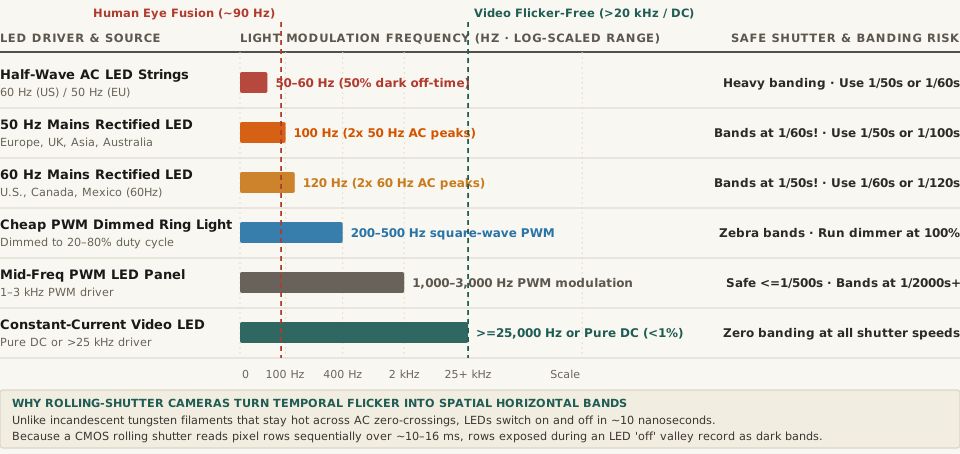
- 100 Hz / 120 Hz AC Mains Rectification Ripple: Every AC wall outlet alternates polarity 50 or 60 times per second. When a cheap LED bulb passes AC power through a basic full-wave bridge rectifier without a large smoothing capacitor, both the positive and negative halves of the sine wave become positive peaks—producing 120 light pulses per second on a 60 Hz grid (8.33 ms per pulse) or 100 light pulses per second on a 50 Hz grid (10.0 ms per pulse). Even worse, inexpensive decorative LED strings use a single diode (half-wave rectification) that blocks half the wave entirely, flashing at 50 Hz or 60 Hz with a 50% pitch-black gap.
- 200 Hz to 1,000 Hz Pulse-Width Modulation (PWM) Dimming: How do smart bulbs, budget USB ring lights, and wall dimmers lower an LED's brightness to 30% or 50%? Instead of smoothly reducing the direct current (which requires a pricier constant-current reduction circuit), they use Pulse-Width Modulation (PWM)—rapidly switching the LED between 100% full brightness and 0% total darkness hundreds of times per second. At 25% brightness on a 250 Hz PWM ring light, the LED is actually completely off for 75% of every 4-millisecond cycle!
“When you dim a PWM-driven ring light or LED bulb to 25% brightness, the diode does not glow at 25% intensity—it flashes at 100% power for one-quarter of each millisecond cycle and sits in total darkness for the remaining 75% of the time.”
3. Why CMOS Rolling Shutters Turn Time Pulses Into Horizontal Stripes
If an LED flashes uniformly across the whole room, why does your camera show horizontal black stripes across a single frame rather than the whole frame getting brighter and darker? Because almost all webcams, smartphones, and mirrorless cameras use a CMOS rolling shutter rather than a mechanical global shutter.
Instead of exposing all 4,000 horizontal rows of pixels at the exact same instant, a rolling shutter reads out the sensor sequentially from top to bottom over 10 to 16 milliseconds. If you set a fast shutter speed like 1/500s (2 milliseconds of exposure per row) under a 120 Hz LED (which turns off every 8.33 milliseconds) or a 300 Hz PWM light, rows 1–400 are exposed while the LED is switched on, rows 401–800 are exposed while the LED is switched off (recording a dark stripe), and rows 801–1200 catch the next on pulse! And if the light's flicker frequency isn't an exact multiple of your video frame rate (for example, shooting 30.00 fps video under European 50 Hz / 100 Hz lights, as detailed in PAL vs. NTSC anti-flicker guides), those dark bands slowly drift vertically down the screen.
Use this reference table to match your camera settings and lighting hardware:
| Light Source or Dimmer Driver Type | Modulation Frequency (Hz) | Human Eye Perception (~90 Hz Limit) | Rolling-Shutter Camera Behavior | Flicker-Free Safe Shutter Speeds |
|---|---|---|---|---|
| 60 Hz Mains Rectified LED (North America) | 120 Hz (2× 60 Hz peaks) | Steady to foveal gaze | Dark rolling bands at 1/50s, 1/250s+ |
1/30s, 1/60s, or 1/120s (NTSC) |
| 50 Hz Mains Rectified LED (Europe / Asia / AU) | 100 Hz (2× 50 Hz peaks) | Steady to foveal gaze | Crawling bands if left in 30/60fps NTSC mode! | 1/25s, 1/50s, or 1/100s (PAL) |
| Half-Wave LED Strings / Holiday Lights | 50 Hz or 60 Hz (1× cycle) | Visible peripheral shimmer | Heavy strobing and thick black bands | 1/50s (50 Hz) or 1/60s (60 Hz) only |
| Low-Freq PWM Dimmed Ring / Desk Light | 200–500 Hz square wave | Steady gaze; stroboscopic hand trail | Hard-edged zebra stripes when dimmed <100% | Set dimmer to 100% power + diffuse |
| Mid-Freq PWM Panel / Monitor Backlight | 1,000–3,000 Hz (1–3 kHz) | Completely steady | Faint fine lines only at ≥1/2000s |
Safe up to 1/500s (use 1/50s–1/120s) |
| Constant-Current (CCR) Video Key Light | ≥25,000 Hz or Pure DC | 100% flicker-free | Zero banding at any shutter speed | All shutter speeds (up to 1/8000s) |
Three Practical Fixes You Can Apply in 30 Seconds
- Switch Your Webcam or Camera Anti-Flicker Mode (50 Hz vs. 60 Hz): So long as each pixel row's exposure time spans at least one full AC light cycle (
1/60s = 16.67 mscovering two 120 Hz pulses in North America, or1/50s = 20.0 mscovering two 100 Hz pulses in Europe/Asia), every row integrates the exact same total amount of light and the bands vanish completely. - Turn PWM Dimmers Up to 100% Brightness: If a dimmable desk lamp or ring light bands on camera, crank its brightness slider to 100%. At 100% duty cycle, most PWM controllers stay continuously closed (eliminating the square-wave chop), and you can reduce brightness physically by moving the lamp farther away or clipping a sheet of diffusion paper over it.
- Use Your Monitor as a Clean DC Softbox: Modern flicker-free DC-dimmed computer monitors emit smooth, continuous light with zero low-frequency PWM chop.
Turn Your Screen Into a Flicker-Free Key Light in Lumet
When overhead office LEDs or hotel lamps cause rolling shutter banding or harsh color casts on Zoom, Meet, or Teams calls, using a clean, color-calibrated screen light fills in shadows with zero PWM flicker. Calibrate video call lighting in Lumet to balance skin-tone color temperature (2700K–6500K) and soft key-light luminance right from your browser.