
Why Do Red Text and Logos Look Blurry in JPEG Photos? How 4:2:0 Chroma Subsampling Works
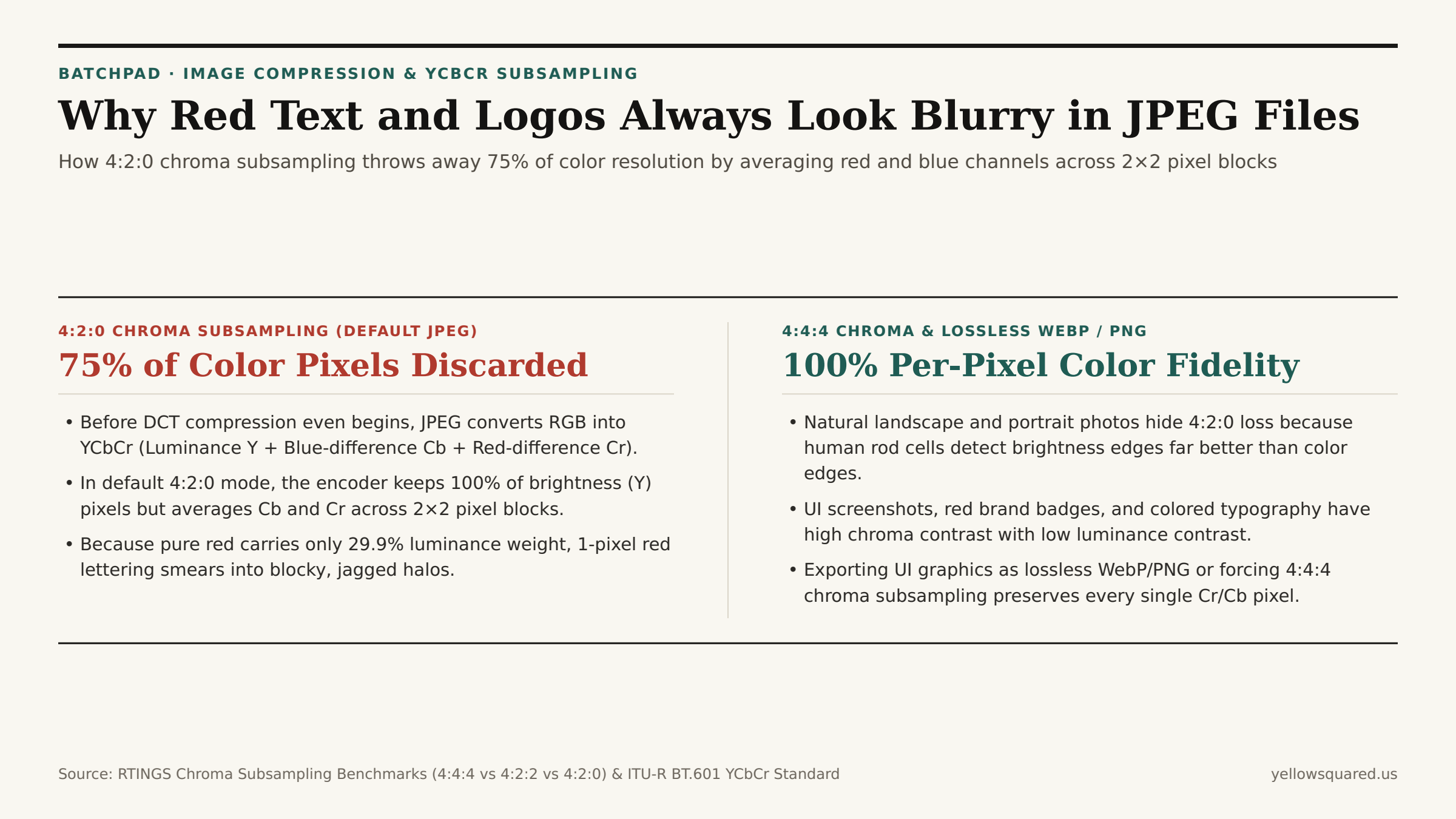
Export a crisp user-interface screenshot or a brand banner containing bright red text on a dark background as a standard .jpg file, and something strange happens immediately: while white and gray text stays razor-sharp, the red letters develop fuzzy, staircase-like halos. Increasing the JPEG quality slider from 75% to 85% barely helps. The culprit is not Discrete Cosine Transform (DCT) blockiness — it is Step 2 of the JPEG pipeline: 4:2:0 chroma subsampling, which permanently discards 75.0% of the image's spatial color resolution before DCT compression even starts.
As demonstrated in the RTINGS Display & Compression Lab Analysis of 4:4:4 vs. 4:2:2 vs. 4:2:0 Chroma Subsampling and detailed in Design Your Way's Technical Anatomy of the JPEG Psychovisual Model, standard JPEG encoders separate brightness from color so they can shrink color channels to a quarter of their original pixel count. To convert screenshots, logos, and product graphics into modern formats without chroma bleed, Optimize batch image exports in BatchPad.
How RGB-to-YCbCr Conversion Starves Pure Red of Luminance
The human retina contains roughly 120 million rod cells (which detect brightness and fine spatial edges) but only 6 to 7 million cone cells (which detect red, green, and blue color wavelengths). To exploit this biological asymmetry, a JPEG encoder first converts every pixel from R, G, B into Y, Cb, Cr using the ITU-R BT.601 matrix:
Y = 0.299 · R + 0.587 · G + 0.114 · B
Notice the weights in that equation: green supplies 58.7% of the luminance (Y) channel, while red supplies only 29.9% and blue supplies just 11.4%. Most of the visual energy of pure saturated red (R=255, G=0, B=0) is shunted out of the full-resolution brightness channel (Y) and stored inside the red-difference chrominance channel (Cr).
The Math of 4:4:4 vs. 4:2:2 vs. 4:2:0 Subsampling Grids
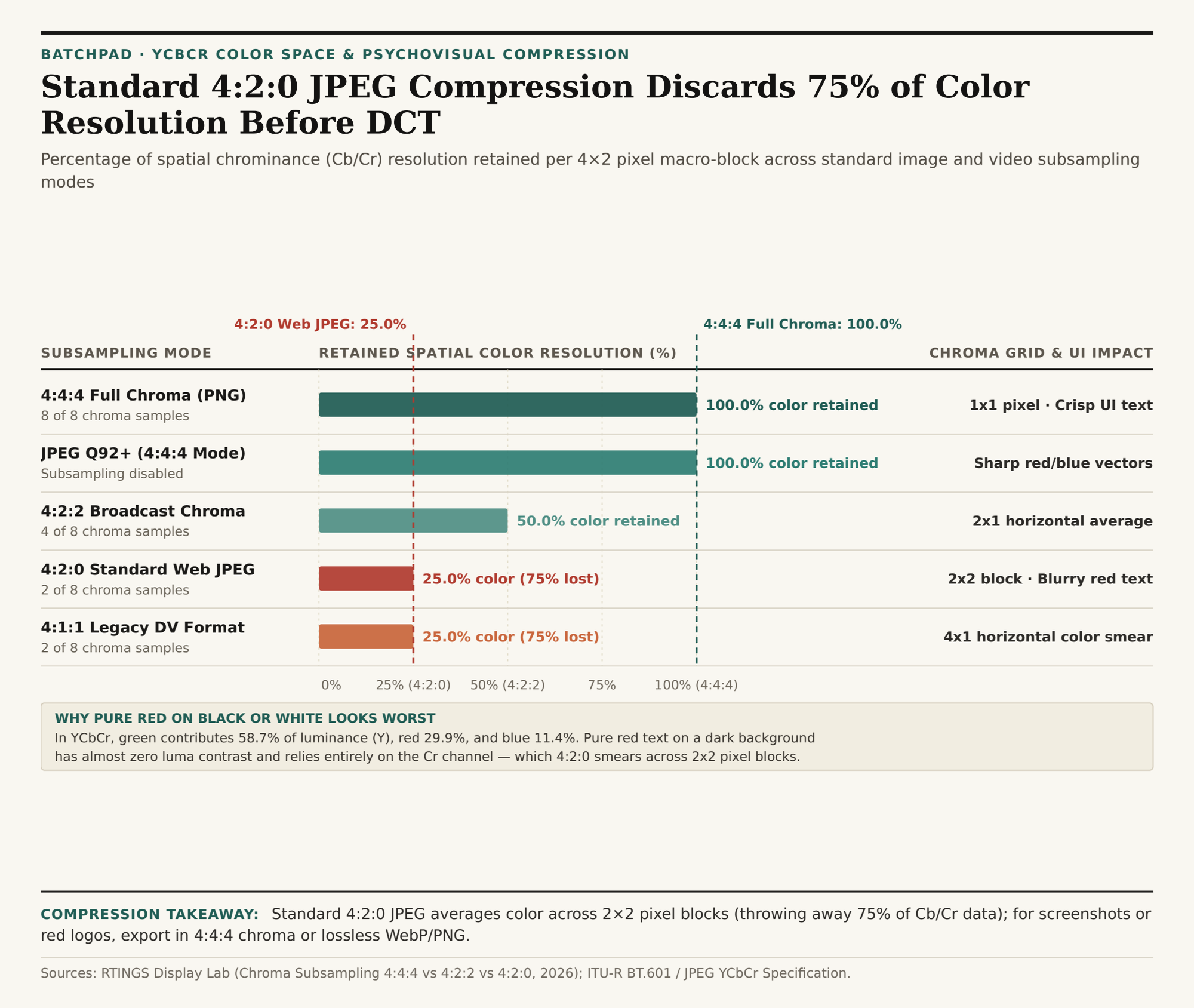
Chroma subsampling notation (J:a:b) describes how many chrominance samples are kept inside a reference block that is 4 pixels wide by 2 pixels tall (8 pixels total):
4:4:4(No Subsampling — 100% Color Resolution): For every 4 luminance pixels in the top row, the encoder keeps 4 chroma pixels; for every 4 in the bottom row, it keeps 4 (8 of 8 chroma samples retained). Uncompressed pixel data stays at full fidelity, keeping 1-pixel red and blue UI strokes pin-sharp.4:2:2(Broadcast Video — 50% Color Resolution): Keeps 2 chroma samples in the top row and 2 in the bottom row (4 of 8 chroma samples retained), cutting horizontal color resolution in half while preserving full vertical color resolution.4:2:0(Default Web JPEG / H.264 — 25% Color Resolution): Keeps 2 chroma samples in the top row and 0 independent chroma samples in the bottom row (2 of 8 chroma samples retained). Every2×2block of four pixels is forced to share a single averagedCbandCrcolor value — throwing away 75.0% of the spatial color grid and cutting raw uncompressed data volume by 50%.
"When a 1-pixel-wide red letter crosses the boundary of a 2×2 pixel block in a 4:2:0 JPEG, the encoder averages the bright red stroke with three adjacent black or white background pixels — bleeding a muddy pink or maroon halo into neighboring pixels."
| Subsampling Scheme | Luma (Y) Grid | Chroma (Cb/Cr) Grid | Color Resolution Retained | Raw Data Savings | Impact on Red / Blue UI Text |
|---|---|---|---|---|---|
4:4:4 (PNG / WebP Lossless) |
4×2 (8 samples) | 4×2 (8 samples) | 100.0% | 0.0% | Razor-sharp 1px edges; zero color bleed |
4:2:2 (Pro Video / High JPEG) |
4×2 (8 samples) | 2×2 (4 samples) | 50.0% | 33.3% | Horizontal color halved; vertical crisp |
4:2:0 (Standard Web JPEG) |
4×2 (8 samples) | 2×1 (2 samples) | 25.0% (75% lost) | 50.0% | 2×2 chroma blocks smear red/blue edges |
4:1:1 (Legacy DV Video) |
4×2 (8 samples) | 1×2 (2 samples) | 25.0% (75% lost) | 50.0% | 4×1 horizontal smear across vertical lines |
How to Prevent Chroma Smearing in Web Exports
Use 4:2:0 JPEG or WebP for natural photographs (landscapes, portraits, and culinary shots) where organic textures mask chroma downsampling and cutting file size by 50% boosts page speed. Whenever your image contains colored UI text, red callout badges, vector diagrams, or brand logos, either export as PNG / lossless WebP (which uses 4:4:4 RGB) or set your JPEG encoder above Quality 90–92 with 4:4:4 chroma subsampling enabled. To inspect file sizes and batch-convert graphics with clean chroma preservation in your browser, Optimize batch image exports in BatchPad and download the chroma subsampling CSV dataset.