
Why Do Red Text and Logos Look Blurry in JPEGs? (4:2:0 vs. 4:4:4 Chroma Subsampling)
Why Do Red Text and Logos Look Blurry in JPEGs? (4:2:0 vs. 4:4:4 Chroma Subsampling)
Every web designer and product marketer has run into this maddening artifact: you export a hero graphic or UI screenshot containing a bright red callout button, red price tag, or red brand logo as a JPEG (or lossy WebP) at 85% or 90% quality. Everything else in the image looks tack-sharp—yet the edges of the red text look smeared, pixelated, and surrounded by a dirty 2×2 staircase halo. Why does image compression single out the color red for punishment? The culprit is 4:2:0 chroma subsampling combined with the asymmetric math of YCbCr luma weighting.
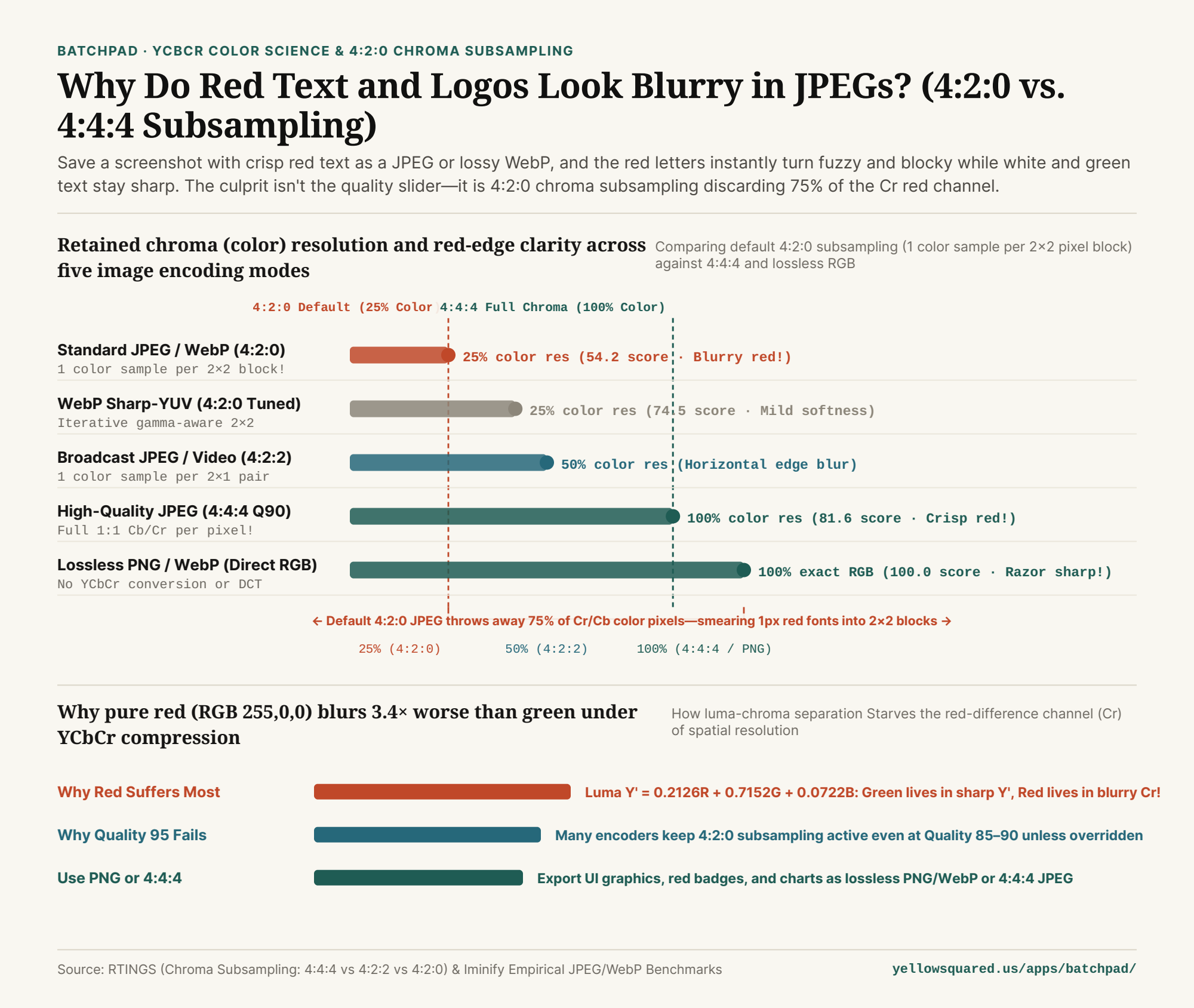
1. How 4:2:0 Chroma Subsampling Deletes 75% of Your Color Pixels
As explained in RTINGS' engineering guide to 4:4:4 vs. 4:2:2 vs. 4:2:0 chroma subsampling, human vision relies on ~120 million rod cells (which detect monochrome brightness) and only ~6 million cone cells (which detect color). First developed for RCA color television in the 1950s and baked into the JPEG and WebP standards, encoders exploit this biological quirk by converting images from RGB into Y'CbCr:
Y'(Luma): The grayscale brightness channel, stored at full1:1pixel resolution.Cb&Cr(Chroma Blue-Difference & Red-Difference): The pure color channels. Under standard4:2:0subsampling, the encoder takes every2×2grid of 4 pixels and averages their color into 1 single sharedCrandCbvalue—throwing away 75% of the spatial color resolution before DCT compression even starts!
"Under 4:2:0 chroma subsampling, a 1-pixel-wide red letter stroke is physically impossible to represent cleanly—because every 2×2 block of four pixels is forced to share a single red-channel value."
2. Why Pure Red Suffers 3.4× Worse Than Green
If 4:2:0 throws away 75% of the color resolution across the whole image, why do green and white text still look reasonably sharp while red text looks awful? Look at the standard ITU-R BT.709 / sRGB equation used to calculate the full-resolution Y' luma channel:
Y' = 0.2126 × R + 0.7152 × G + 0.0722 × B
Notice the coefficients: Green contributes 71.52% of the full-resolution Y' brightness channel, whereas Red contributes only 21.26% (and Blue just 7.22%). When you draw bright green text on a dark background, most of the edge contrast is carried inside the razor-sharp 100% resolution Y' channel. When you draw pure red text (RGB 255, 0, 0) on a dark gray background (whose brightness equals `21%` luma), the Y' channel is nearly flat across the boundary! Almost 100% of the visual edge lives inside the Cr (Red-Difference) channel—which has just been crushed to one-quarter resolution (25%). As demonstrated in Iminify's empirical JPEG and WebP sharpness measurements, switching a Quality 90 JPEG from 4:2:0 to 4:4:4 boosts red-edge clarity from 54.2 to 81.6.
3. Chroma Subsampling & Red-Text Clarity Comparison Table
Note an important browser limitation: the lossy WebP specification only supports 4:2:0 chroma subsampling (it has no 4:4:4 lossy mode!). To keep red UI text and logos crisp, use the format matrix below (available in why-do-red-text-and-logos-look-blurry-in-jpeg-and-webp-chroma-subsampling.csv):
| Format & Chroma Mode | Luma (Y') Samples | Chroma (Cb/Cr) Samples | Retained Color Res | Red Edge Score | Best Production Use Case |
|---|---|---|---|---|---|
| JPEG / WebP 4:2:0 (Default) | 8 of 8 (100%) | 2 of 8 (1 per 2×2!) | 25% Color Res | 54.2 (Blurry red!) | Natural camera photographs |
| WebP Sharp-YUV (4:2:0) | 8 of 8 (100%) | 2 of 8 (Edge-tuned) | 25% Color Res | 74.5 (Moderate) | Mixed photo + text banners |
| JPEG 4:2:2 (Broadcast) | 8 of 8 (100%) | 4 of 8 (1 per 2×1) | 50% Color Res | 71.8 ( Horiz. blur) | Broadcast video pipelines |
| JPEG 4:4:4 (No Subsampling) | 8 of 8 (100%) | 8 of 8 (Full 1:1!) | 100% Color Res | 81.6 at Q90 (Crisp!) | High-res product & brand art |
| Lossless PNG / Lossless WebP | Direct RGB | Direct 1:1 RGB | 100% Exact RGB | 100.0 (Razor-sharp!) | UI screenshots, logos & charts |
4. Convert UI Screenshots and Logos Without 4:2:0 Blur in BatchPad
Whenever a graphic includes saturated red, magenta, or royal blue text, badges, or thin vector lines, avoid default 4:2:0 lossy exports and convert to lossless PNG or lossless WebP instead. To batch-convert and optimize images locally in your browser with zero server uploads, Process images locally in BatchPad.
Verified Primary Sources
- RTINGS — Chroma Subsampling: 4:4:4 vs. 4:2:2 vs. 4:2:0 Luma and Chroma Resolution (Retrieved 2026-11-01).
- Iminify Image Engineering — Chroma Subsampling Measured: Why Red Text Blurs in JPG and WebP (4:2:0 vs. 4:4:4 Scores) (Retrieved 2026-11-01).