
Why Do Vertical Photos Sometimes Upload Sideways? EXIF Orientation Tags (1 to 8) Explained
Almost every photographer, designer, and software engineer has run into the Phantom Sideways Portrait Bug: you shoot a vertical portrait photo on an iPhone, Nikon, Sony, or Canon camera. When you open the image in macOS Preview, Apple Photos, Lightroom, or a modern browser tab, it stands upright at 4000 × 6000 pixels. Yet the moment you pass that exact same JPEG through an image-resizing script, strip its metadata for privacy, or upload it to a legacy CMS or canvas pipeline, the photo suddenly flops 90 degrees onto its left side at 6000 × 4000 pixels.
Why is a vertical photo secretly stored sideways inside the file—and why does deleting metadata change the physical shape of an image? The answer lies in a 2-byte unsigned short integer buried inside the JPEG header: EXIF Tag 0x0112 (Orientation, values 1 through 8). Here is why camera hardware engineers invented it, what all eight orientation numbers mean, and how to bake orientation into your pixels losslessly so your exports never flip sideways again.
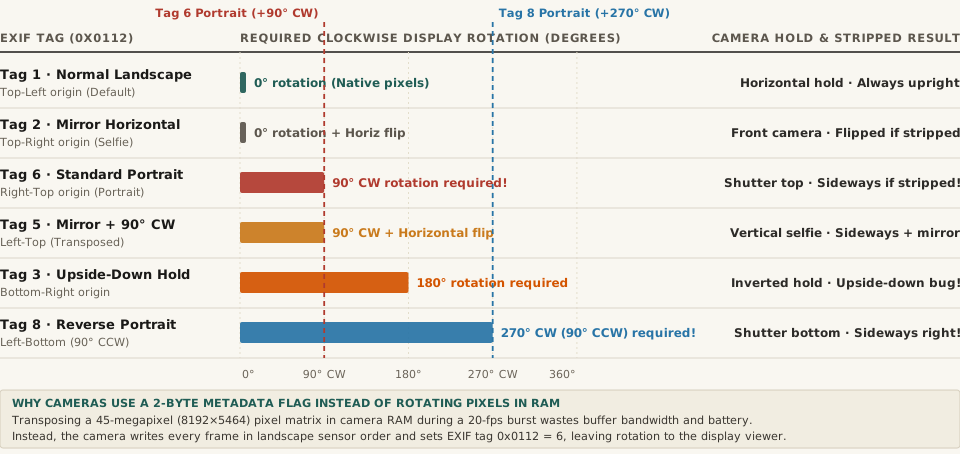
Orientation tag values (0x0112), showing why vertical portraits stored with Tag 6 (+90° CW) or Tag 8 (+270° CW) revert to horizontal landscape orientation if metadata is stripped without transposing pixels. Download the full dataset: exif-orientation-tags-1-to-8-0x0112-sensor-rotation-and-mirror-mapping.csv.1. Why Camera Sensors Never Rotate Pixels in RAM During Capture
When you turn a 45-megapixel mirrorless camera or a 48-megapixel smartphone 90 degrees to frame a vertical portrait, the physical CMOS sensor inside the camera body turns with your hands. However, the hardware readout circuitry wired to that sensor always streams pixel rows out to the image processor in the exact same fixed hardware order: along the long horizontal edge of the sensor (for example, 8,192 columns wide by 5,464 rows tall).
To physically rewrite an 8192 × 5464 landscape matrix into a 5464 × 8192 portrait matrix before encoding the JPEG, the camera's onboard processor would have to perform an out-of-place matrix transposition across 45 million RGB pixels in dynamic RAM on every single frame—thrashing CPU cache lines, draining battery, and bottlenecking continuous 15-to-30-fps burst shooting.
Instead, as detailed in the JPEG and EXIF file format specification and EXIF tag 0x0112 documentation, camera engineers adopted a zero-latency shortcut: the camera writes the raw pixels to the SD card or flash storage in unrotated landscape sensor order, reads its internal 3-axis gravity accelerometer, and writes a single 16-bit integer (1 to 8) into the EXIF Orientation tag (0x0112, decimal 274) inside the APP1 header segment.
“When you take a vertical photo on an iPhone or mirrorless camera, the JPEG file on disk is still a horizontal landscape image—accompanied by a 2-byte EXIF Tag 6 instruction telling your screen to rotate it 90 degrees clockwise on the fly.”
2. The Complete Lookup Table of EXIF Orientation Values (Tags 1 to 8)
Why are there eight EXIF Orientation numbers when a rectangle only has four 90-degree rotations (0°, 90°, 180°, and 270°)? Because the CIPA EXIF standard encodes the complete dihedral group D4 of a rectangle: four rotations multiplied by two mirror states (normal vs. horizontally flipped, used by front-facing selfie cameras and optical mirror rigs).
Here is the complete engineering reference for all eight values of 0x0112:
EXIF Tag Value (0x0112) |
Sensor 0th Row, 0th Col Origin | Required CW Display Rotation | Mirror Flip Applied | Physical Camera Hold Position | Result If EXIF Is Stripped Without Transpose |
|---|---|---|---|---|---|
| Tag 1 (Normal) | Top-Left |
0° (None) | No flip | Standard horizontal landscape hold | Displays 100% upright everywhere |
| Tag 6 (Rotate 90 CW) | Right-Top |
+90° CW | No flip | Standard vertical portrait (Camera turned 90° CCW) | Uploads SIDEWAYS (Lying on its left side!) |
| Tag 3 (Rotate 180) | Bottom-Right |
+180° | No flip | Upside-down landscape hold | Uploads UPSIDE DOWN |
| Tag 8 (Rotate 270 CW) | Left-Bottom |
+270° CW (90° CCW) | No flip | Reverse vertical portrait (Shutter button at bottom) | Uploads SIDEWAYS (Lying on its right side!) |
| Tag 2 (Mirror Horizontal) | Top-Right |
0° (+Horiz Flip) | Left-Right Flip | Mirrored horizontal selfie capture | Displays left-to-right mirrored |
| Tag 4 (Mirror Vertical) | Bottom-Left |
180° (+Horiz Flip) | Top-Bottom Flip | Inverted mirrored landscape capture | Displays upside down and mirrored |
| Tag 5 (Transpose) | Left-Top |
+90° CW (+Flip) | Diagonal Flip | Mirrored vertical selfie portrait | Displays sideways and mirrored |
| Tag 7 (Transverse) | Right-Bottom |
+270° CW (+Flip) | Diagonal Flip | Reverse mirrored vertical selfie | Displays sideways and mirrored |
3. The Three Classic Software Bugs Caused by Tag 6 and Tag 8—and How to Fix Them
As documented in long-running web platform bug trackers such as Drupal Core Issue #2664632 on EXIF Orientation, three distinct bugs occur when software pipelines forget about Tag 6 and Tag 8:
- The Privacy-Scrubber Rotation Bug: Many social platforms, CMS uploaders, and Python/Node image pipelines strip all EXIF metadata on upload to remove GPS coordinates and serial numbers. If your pipeline strips the
APP1EXIF block before physically rotating the pixel grid,Tag 6is erased forever—and every browser on Earth is forced to render the raw landscape pixel array on its side. - The Swapped Width/Height Validation Bug: If an upload validator checks
image.widthandimage.heightfrom the raw JPEG frame header (SOF0) before applying EXIF orientation, a1080 × 1350vertical portrait stored withTag 6will report its raw dimensions as1350 × 1080—failing aspect-ratio checks or getting cropped along the wrong axis! - The One-Line Fix Across Languages: Whenever you process user-uploaded photos in code or on the command line, bake the orientation into the pixels and reset Tag
0x0112to1as the very first step:- Python (Pillow): Call
img = ImageOps.exif_transpose(img)immediately afterImage.open(). - ImageMagick CLI: Pass
magick input.jpg -auto-orient output.jpgbefore any-resizeor-stripflags. - Lossless DCT Block Rotation (Zero Generation Loss): As noted in fileformats.dev's JPEG engineering guide, if a JPEG's dimensions are multiples of 8 or 16 pixels (the Minimum Coded Unit block size),
jpegtran -rotate 90 -perfectorexifautotrancan transpose the compressed 8×8 DCT blocks directly without decoding and re-compressing the pixels!
- Python (Pillow): Call
Normalize Aspect Ratios, Borders, and Carousel Crops in BatchPad
When you are combining vertical 4:5 portraits, horizontal 3:2 camera RAW exports, and panoramic multi-slide spreads into a single social media carousel, mismatched EXIF orientation tags or swapped dimensions can ruin a seamless layout. Plan multi-slide carousels in BatchPad to auto-orient, pad, and export pixel-accurate slides with clean, normalized metadata.