
Why Is 300 PPI the Standard for Photo Printing, and How Does Viewing Distance Change Required Megapixels?
Open any commercial print-lab specification sheet or export preset and you will see the same universal rule: export files at 300 PPI (pixels per inch). Yet when photographers multiply 300 PPI by the dimensions of a large 24 × 36 inch gallery poster (7200 × 10800 px = 77.8 megapixels) or a 40 × 60 inch wall mural (12000 × 18000 px = 216 megapixels), they panic and assume their 24 MP or 45 MP full-frame camera cannot print large without turning into a blurry mosaic.
In reality, the 300 PPI benchmark is not a fixed law of ink on paper—it is a single point on an inverse trigonometric curve governed by viewing distance and the angular resolution of the human fovea. As demonstrated in psychophysical vision research from the University of Cambridge on the resolution limit of the human eye and optical engineering guides from RED Digital Cinema, once you step back to a comfortable viewing distance proportional to the frame size, a huge 24 × 36 inch poster or a 16 × 24 foot highway billboard requires no more total megapixels than an 8 × 12 inch handheld print (~8.6 to 12 MP). When preparing exhibition prints, editorial book plates, or padded gallery borders, you can Batch-pad and frame high-DPI print canvases in BatchPad with exact pixel dimensions tailored to your target viewing distance.
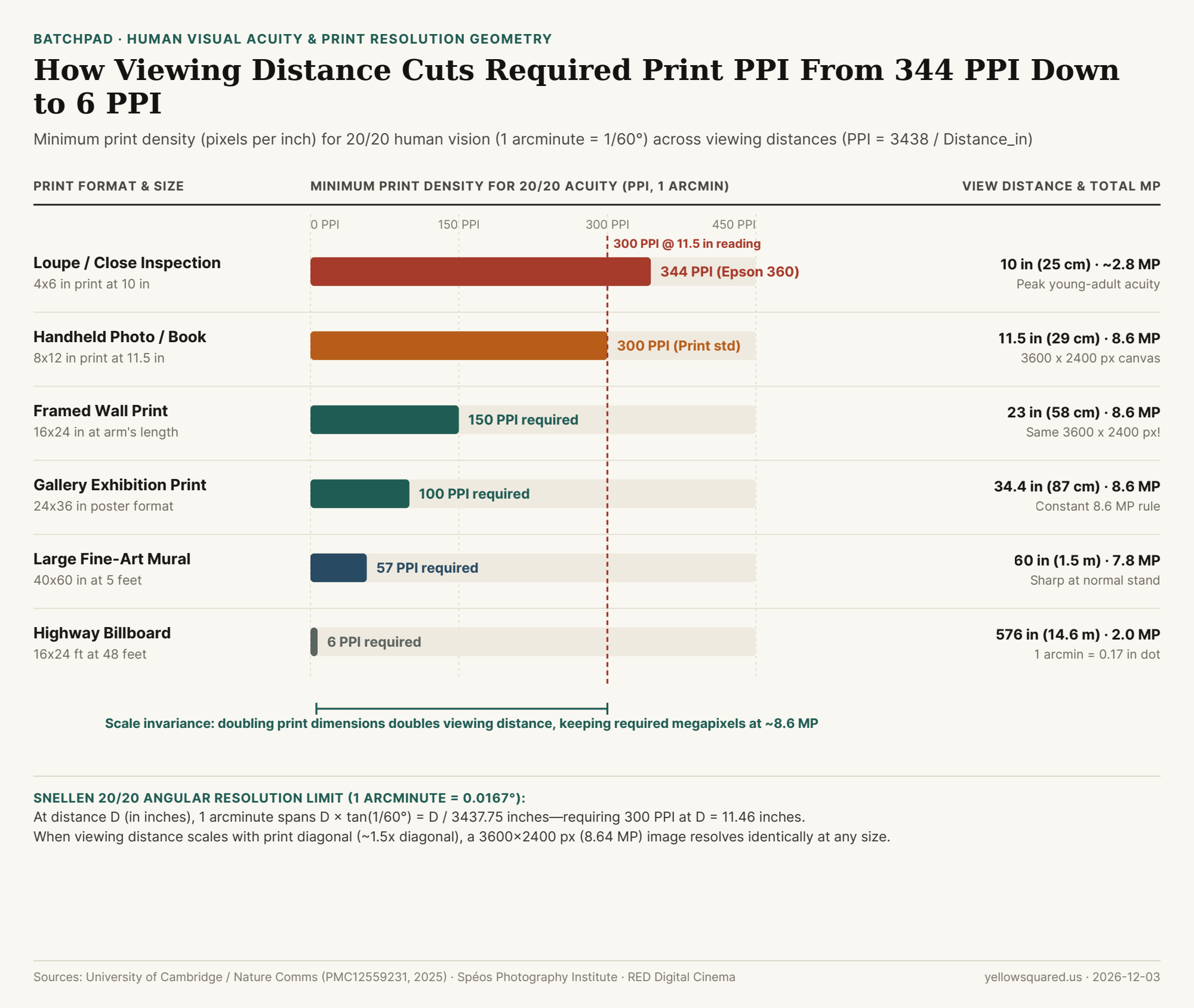
The 1-Arcminute Trigonometry Behind 300 PPI
In ophthalmology and optical physics, standard 20/20 (6/6) Snellen visual acuity is defined as the ability to resolve a spatial cycle of one dark line and one white gap subtending 2 arcminutes of visual angle—meaning the smallest individual pixel or dot that the human eye can distinguish before adjacent dots blend into continuous tone subtends an angle of 1 arcminute (θ = 1/60° ≈ 0.01667° ≈ 0.00029089 radians).
Using basic right-triangle trigonometry at a viewing distance D (measured in inches from the observer's eye to the paper), the physical width s of a single 1-arcminute pixel on the print is:
s = 2 × D × tan(1 / 120°) ≈ D / 3437.75 inches
Taking the reciprocal (1 / s) gives the exact formula for the minimum print resolution (PPI) at which individual pixels become invisible to 20/20 vision at distance D:
Minimum PPI = 3437.75 / Viewing Distance (in inches)
Plug in a comfortable handheld reading distance of D = 11.46 inches (29.1 cm, or roughly one imperial foot) and the formula outputs 3437.75 / 11.46 = 300.0 PPI. As noted by the Spéos Photography Institute, young adults with peak contrast sensitivity at the closest comfortable near-point (D = 10 inches / 25 cm) can resolve up to 7 line pairs per millimeter (14 pixels/mm), which equals 344 to 356 PPI—the exact reason Canon and HP native print heads operate at 300 PPI while Epson piezo print heads operate at 360 PPI.
"Because comfortable viewing distance doubles whenever you double the diagonal of a print, the required PPI drops in half while the surface area quadruples—canceling out so that an 8.64-megapixel (3600 × 2400 px) file looks equally sharp at 8×12 inches, 16×24 inches, or 24×36 inches."
Why Scale Invariance Caps Required Resolution at ~8.6 to 12 Megapixels
Why don't billboards or gallery murals require hundreds of megapixels? Human vision has a comfortable sharp horizontal field of view of roughly 35° to 50°, which means viewers naturally stand at a distance equal to 1.0 to 1.5 times the diagonal of the artwork. For an 8 × 12 inch (3:2) print, the diagonal is √(8² + 12²) = 14.4 inches, and holding it at 0.8× diagonal (11.5 inches) requires 300 PPI:
(8 in × 300 PPI) × (12 in × 300 PPI) = 2400 × 3600 pixels = 8,640,000 pixels (8.64 MP)
Now double the linear dimensions to a 16 × 24 inch wall print (28.8-inch diagonal). A viewer standing at 23 inches (~2 feet) away only resolves 3438 / 23 = 150 PPI. Multiplying 16 in × 150 PPI by 24 in × 150 PPI yields the exact same 2400 × 3600 pixels (8.64 MP)! As detailed in Ashraf et al.'s Cambridge resolution-limit analysis, angular spatial frequency—measured in pixels per degree (PPD) at the retina, not pixels per inch on the wall—determines perceived sharpness.
| Print Format & Aspect (3:2) | Physical Dimensions | Typical Viewing Distance | 20/20 Acuity PPI | Required Pixel Canvas | Total Megapixels |
|---|---|---|---|---|---|
| Close Loupe / Fine Book Plate | 4 × 6 in |
10.0 in (25.4 cm) |
344 PPI (Epson 360) |
1376 × 2064 px |
2.84 MP |
| Handheld Photo / Magazine | 8 × 12 in |
11.5 in (29.2 cm) |
300 PPI (Canon/HP) |
2400 × 3600 px |
8.64 MP |
| Framed Wall Print (Arm's Length) | 16 × 24 in |
23.0 in (58.4 cm) |
150 PPI |
2400 × 3600 px |
8.64 MP |
| Gallery Exhibition Poster | 24 × 36 in |
34.4 in (87.4 cm) |
100 PPI |
2400 × 3600 px |
8.64 MP |
| Large Fine-Art Wall Mural | 40 × 60 in |
60.0 in (1.52 m) |
57 PPI |
2280 × 3420 px |
7.80 MP |
| Highway Billboard | 16 × 24 ft (192×288 in) |
48.0 ft (14.6 m) |
6 PPI |
1152 × 1728 px |
1.99 MP |
When Do You Actually Need 24 MP, 45 MP, or 100 MP?
There is one exception where high-megapixel sensors (45 MP to 100 MP medium format) genuinely matter: gallery prints where viewers violate the proportional distance rule. In a museum or fine-art gallery, a viewer will first admire a 24 × 36 inch landscape from 3 feet away (100 PPI needed), and then walk right up to 11.5 inches to inspect fine foliage or eyelashes (300 PPI needed = 7200 × 10800 px = 77.8 MP).Adding a clean white mat border or editorial title margin also reduces the active image area on the paper, boosting effective PPI by 15% to 30%. Before sending your next portfolio batch to the printer, Batch-pad and frame high-DPI print canvases in BatchPad to add proportional gallery borders while preserving every native sensor pixel.