
Why Do Red Text and Logos Look Blurry in JPEG Images? How 4:2:0 Chroma Subsampling Compresses Color Resolution
Take a crisp screenshot of a user interface or brand banner featuring bright red text (#FF0000) or electric blue icons (#0000FF) on a dark charcoal background, and save it as a standard web JPEG (or lossy WebP) at Quality 80. When you open the exported file at 100% zoom, the white and green text still looks sharp—yet the red and blue letters look fuzzy, blocky, and fringed with muddy 2×2 pixel stairs, even if you raise the JPEG quality slider to 85. That blur is not caused by DCT frequency quantization; it is caused by an earlier step in the compression pipeline called 4:2:0 chroma subsampling, which throws away 75% of your image’s color pixels before compression even begins.
When you batch-convert screenshots, product graphics, and photography in BatchPad, understanding how YCbCr color encoding separates brightness (Y') from color (Cb, Cr) shows you exactly when 4:2:0 saves 50% bandwidth for free—and when you must switch to lossless PNG/WebP or 4:4:4 chroma.
How YCbCr Splits Brightness From Color (and Why 4:2:0 Drops 3 Out of 4 Color Pixels)
When an image encoder prepares an RGB image for JPEG, WebP, AVIF, or H.264/HEVC video compression, it first transforms every pixel from [R, G, B] into three decorrelated channels defined by Y′CbCr (ITU-R BT.601 or BT.709):
- 1. Luma (
Y'— Achromatic Brightness): Weighted according to human cone sensitivity:Y′ = 0.2126 R + 0.7152 G + 0.0722 B(inBT.709/sRGB). Because the human eye has vastly higher spatial acuity for black-and-white brightness detail than for color hue shifts, encoders always keep 100% of the Luma (Y') channel at full1×1pixel resolution. - 2. Chroma (
CbBlue-Difference &CrRed-Difference): The remaining two channels store only color deviation from neutral gray:Cb = (B - Y') / 1.8556andCr = (R - Y') / 1.5748. - 3. The
J:a:bNotation (4:4:4vs.4:2:2vs.4:2:0): Chroma subsampling ratios are written across a conceptual 4-pixel-wide by 2-pixel-high (4×2 = 8 pixels) reference block:4:4:4= 4 chroma samples on row 1, 4 on row 2 (8 of 8 = 100%color resolution; zero subsampling).4:2:2= 2 chroma samples on row 1, 2 on row 2 (4 of 8 = 50%color resolution; halved horizontally).4:2:0= 2 chroma samples on row 1, 0 independent samples on row 2 (2 of 8 = 25%color resolution; every2×2square of 4 pixels shares a single averagedCbandCrcolor value!).
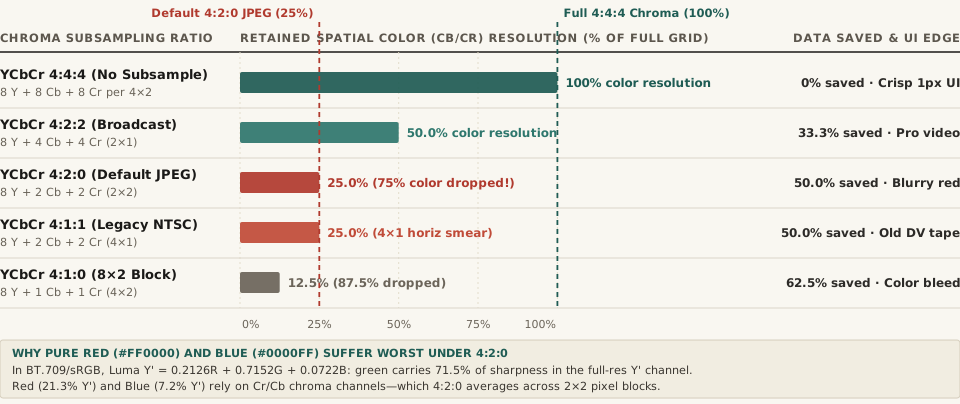
Cb/Cr) resolution (% of full pixel grid) and raw uncompressed data savings across five YCbCr subsampling schemes. Download the complete technical comparison table in chroma-subsampling-444-422-420-color-resolution-comparison.csv.Comparing Chroma Subsampling Schemes: Resolution, Bandwidth, and Text Artifacts
Why does 4:2:0 look completely invisible on a landscape photograph or portrait, yet immediately ruin a UI screenshot containing red badges or blue links?
| Subsampling Ratio | Luma (Y′) Samples per 4×2 | Chroma (Cb/Cr) Samples per 4×2 | Retained Color Resolution | Raw Chroma Data Savings | Visual Impact on Fine UI Text & Logos |
|---|---|---|---|---|---|
| YCbCr 4:4:4 (Full) | 8 of 8 (1×1) |
8 Cb + 8 Cr | 100.0% | 0.0% |
Razor-sharp 1-pixel red, blue, and magenta strokes |
| YCbCr 4:2:2 (Broadcast) | 8 of 8 (1×1) |
4 Cb + 4 Cr (2×1) | 50.0% | 33.3% |
Sharp horizontal lines; minor 2px horizontal bleed |
| YCbCr 4:2:0 (Web Default) | 8 of 8 (1×1) |
2 Cb + 2 Cr (2×2) | 25.0% | 50.0% |
75% color dropped; blurry 2×2 blocks on red/blue text |
| YCbCr 4:1:1 (Legacy DV) | 8 of 8 (1×1) |
2 Cb + 2 Cr (4×1) | 25.0% | 50.0% |
4-pixel horizontal color smearing on vertical edges |
| YCbCr 4:1:0 (Extreme) | 8 of 8 (1×1) |
1 Cb + 1 Cr (4×2) | 12.5% | 62.5% |
87.5% color dropped; severe color halos |
“Because Luma Y′ = 0.2126R + 0.7152G + 0.0722B derives 71.5% of its brightness from green and only 21.3% from red (and 7.2% from blue), a pure red letter on a dark gray background has almost zero luma contrast—forcing its edges to rely on the 1/4-resolution Cr chroma grid.”
Three Rules for Choosing Image Formats Without Blurry Color Edges
- Why Lossy WebP Still Uses
4:2:0(YUV420p) by Default: Many developers assume switching a UI screenshot from JPEG to lossy WebP will fix blurry red text. However, standard lossy WebP is built on theVP8video intra-frame coder, which usesYCbCr 4:2:0exclusively (though WebP’s"Sharp YUV"option iteratively optimizes the2×2chroma downsampling to reduce color bleeding). For pixel-exact UI screenshots, use Lossless WebP or PNG (which stay in fullRGB 4:4:4). - When Exporting High-Quality JPEGs (
Q ≥ 90), Check the Subsampling Toggle: Most JPEG encoders (libjpeg-turbo, Photoshop, ImageMagick) automatically switch from4:2:0(2×2subsampling) to4:4:4(1×1no subsampling) when quality is set to90or above (or in PhotoshopSave for WebatQuality 51+). If you export a product graphic with red typography atQuality 85, forcing4:4:4chroma produces cleaner text than raising DCT quality alone. - Add Subtle Luma Contrast Behind Red or Blue UI Badges: If your asset must be delivered over a
4:2:0video stream or thumbnail feed, avoid placing pure red (Y' = 0.21) against a dark gray background of identical luma (#363636,Y' = 0.21). Shifting the background darker (#141414) or the text lighter gives the full-resolutionY'luma channel a crisp edge to anchor the eye.
Batch-converting product photos, web graphics, and UI screenshots across PNG, JPEG, and WebP? Open BatchPad to process your images locally in your browser with full control over format and quality, or browse our image compression guides.