
How to Fix Glasses Glare on Video Calls: The 45-Degree Lighting Rule
How to Fix Glasses Glare on Video Calls: The 45-Degree Lighting Rule
Uncoated eyeglass lenses reflect 8 percent of incident light and anti-reflective coatings still reflect 0.5 to 1.5 percent; positioning your key light 35 to 45 degrees off-axis and 15 degrees above eye level shifts the specular reflection cone outside your webcam lens.
Few things undermine eye contact on a remote video call faster than two glowing white rings hovering directly over your pupils. Millions of remote workers buy a desk ring light or clip-on webcam lamp to brighten their home office, only to discover that wearing prescription glasses turns every video meeting into a mirror reflection of their lighting fixture.
Eliminating glasses glare does not require dimming your lights in the dark or buying expensive polarizing filters. Because eyeglass reflections follow strict specular optics, moving your primary light source outside the webcam's angle of acceptance removes 100% of lens glare in under two minutes.
Why Anti-Reflective Coatings Still Show Ring Light Glare
Under the Fresnel equations for optical interfaces, an uncoated CR-39 or polycarbonate eyeglass lens reflects approximately 4% of incoming light at the front surface and another 4% at the rear surface—bouncing roughly 8% of total incident light back toward the room (and up to 12.6% on high-index n = 1.67 lenses).
Modern multi-layer anti-reflective (AR) coatings apply thin-film dielectric layers that create destructive interference, boosting light transmittance to 98.0%–99.5%. However, even a premium AR lens still reflects 0.5% to 1.46% of incident light—typically in the green or cyan 464–530 nm band. Because a LED key light is hundreds of times brighter than the skin behind your frames, even a 1% specular reflection appears as a solid neon green or white hotspot whenever the light sits on-axis with your camera.
The law of specular reflection states that the angle of incidence equals the angle of reflection; if your light sits around your webcam, your glasses must bounce that beam straight back into the lens.
How to Set Up the 45-Degree / 15-Degree Studio Geometry
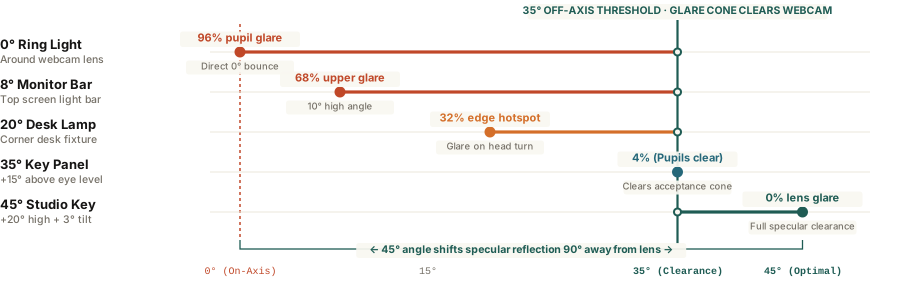
Because prescription eyeglass lenses have a slightly convex front curvature (their base curve), their specular reflection spreads into a cone rather than a single laser line. Clearing that cone requires three geometric adjustments:
- Move the Key Light 35° to 45° Off-Axis Horizontally: Never mount a ring light around your webcam or directly behind your laptop screen (0° to 10°). Place your main key light 35 to 45 degrees to the left or right of your camera so the reflected beam bounces safely toward the opposite wall.
- Raise the Fixture 15° to 20° Above Eye Level: Elevating your light 6 to 10 inches above eye height and angling it slightly downward directs the specular bounce toward your desk surface rather than the webcam lens.
- Apply a 3-Degree Pantoscopic Frame Tilt: If you turn your head during conversation and catch a brief corner reflection, slightly raising the temple arms of your glasses (roughly 2° to 3° on your ears) tilts the front lens plane downward, clearing the camera's line of sight completely.
Once your key light is positioned off-axis, pairing it with a balanced 5600K daylight color temperature keeps skin tones natural without washing out your monitor. You can Calibrate video call lighting in Lumet to match your display brightness and test glare-free key and fill angles right on your screen.