YellowSquared  /  Field notes

Notes from the workshop

19 posts, newest first. Choose an app to narrow the feed.

017 / 19

How Long Does It Take to Form a Habit?

Twenty-one days is not a rule. In one real-world study, the median time to get close to automatic was 66 days, with individual estimates ranging from 18 to 254. That wide range is the useful part: there is no deadline that works for everyone.

Phillippa Lally and her colleagues followed volunteers who chose a simple eating, drinking, or activity habit. They repeated it in the same situation each day and recorded how automatic it felt.

The 66 days was the median for participants whose results fit the researchers’ model. It was not a countdown to a switch flipping. Missing one chance to do the habit did not appear to derail the process.

Make the repeat easy

  1. Pick a small action. “Walk for ten minutes” is easier to repeat than “get in shape.”
  2. Attach it to a cue. For example, walk after lunch or write after you make coffee.
  3. Keep going after a missed day. Resume at the next ordinary chance, without restarting a streak.

When I built Timeli, I wanted its timeline to show the days you did something and the days you did not. One missed check-in should not erase the rest of your history.

Source: Lally et al., “How are habits formed: Modelling habit formation in the real world”.

018 / 19

How to Choose a Habit Tracker Without a Subscription

Start by checking whether you can record a habit quickly and keep access to its history. A free or one-time-purchase tracker can be a useful choice, but its schedule, data handling and daily logging flow matter as much as its price.

Take a small example: you want to walk for ten minutes after lunch on weekdays. A tracker that expects a daily streak may mark weekends as failures unless it supports your schedule. A tracker with a polished dashboard can still be awkward if logging the walk takes several screens.

Define what you want to record

Write down one action and its schedule before comparing apps. “Walk for ten minutes after lunch, Monday to Friday” gives you something specific to log. “Be healthier” leaves both the action and the result unclear.

Choose the unit too. A yes/no check-in suits a completed walk. Minutes may suit practice sessions. Timestamps may help if you want to understand when an activity happens.

NeedFeatureWhat to confirm
Fast loggingA short path from opening to savingIt works on an ordinary busy day
A realistic scheduleSelected days or a weekly targetPlanned rest days fit your schedule
Visible historyDates, totals or a timelineEarlier entries stay visible after a gap
Control of recordsExport, backup and deletion optionsYou can take the data with you

Compare the full cost

“No subscription” can mean free, ad-supported, a one-time purchase or a free tier with paid features. Check the store listing and the actual purchase screen for your platform and region. Avoid treating an old article's price as a current quote.

A recurring fee may support services you want, such as coaching or shared programs. If you only need a personal log, compare the cost with a simple app, spreadsheet or paper record. Choose the service you will use rather than the largest feature list.

Check access before building a long history

Find out where records are stored, whether an account is required, and how backup works. Read what happens when a trial ends or a paid plan is cancelled. Viewing old entries, adding new entries and exporting data may have different rules.

Try an export with a few sample entries. Open the file and check dates, notes and units.

Run a two-week trial with one habit

  1. Set one clear action and a schedule you can reasonably attempt.
  2. Use one reminder only if you need it.
  3. Log close to the action, or at a consistent review time.
  4. Leave missed entries visible; use a brief note if it adds context.
  5. At the end, review both your activity and the effort of using the tracker.

Ask two separate questions: did the action fit the schedule, and did the logging tool fit your day? A missed walk after a late meeting suggests a different problem from completing the walk but forgetting to record it.

Choose a view that keeps the useful history visible

A streak can show consecutive completions. A timeline can show the whole pattern, including gaps. If you complete fifteen walks in twenty-one days, a current streak of one day still leaves fifteen completed walks in the record.

The timeline and streak comparison illustrates that exact example. I built Timeli because I wanted a simple way to log moments without a subscription. Check the current listing for pricing and device support.

The trial above is a practical evaluation method, not evidence that a particular tracker causes a habit to stick. Keep the system small enough that you can see whether it is helping.

019 / 19

One-Day Streak, Fifteen Completed Days: What a Timeline Adds

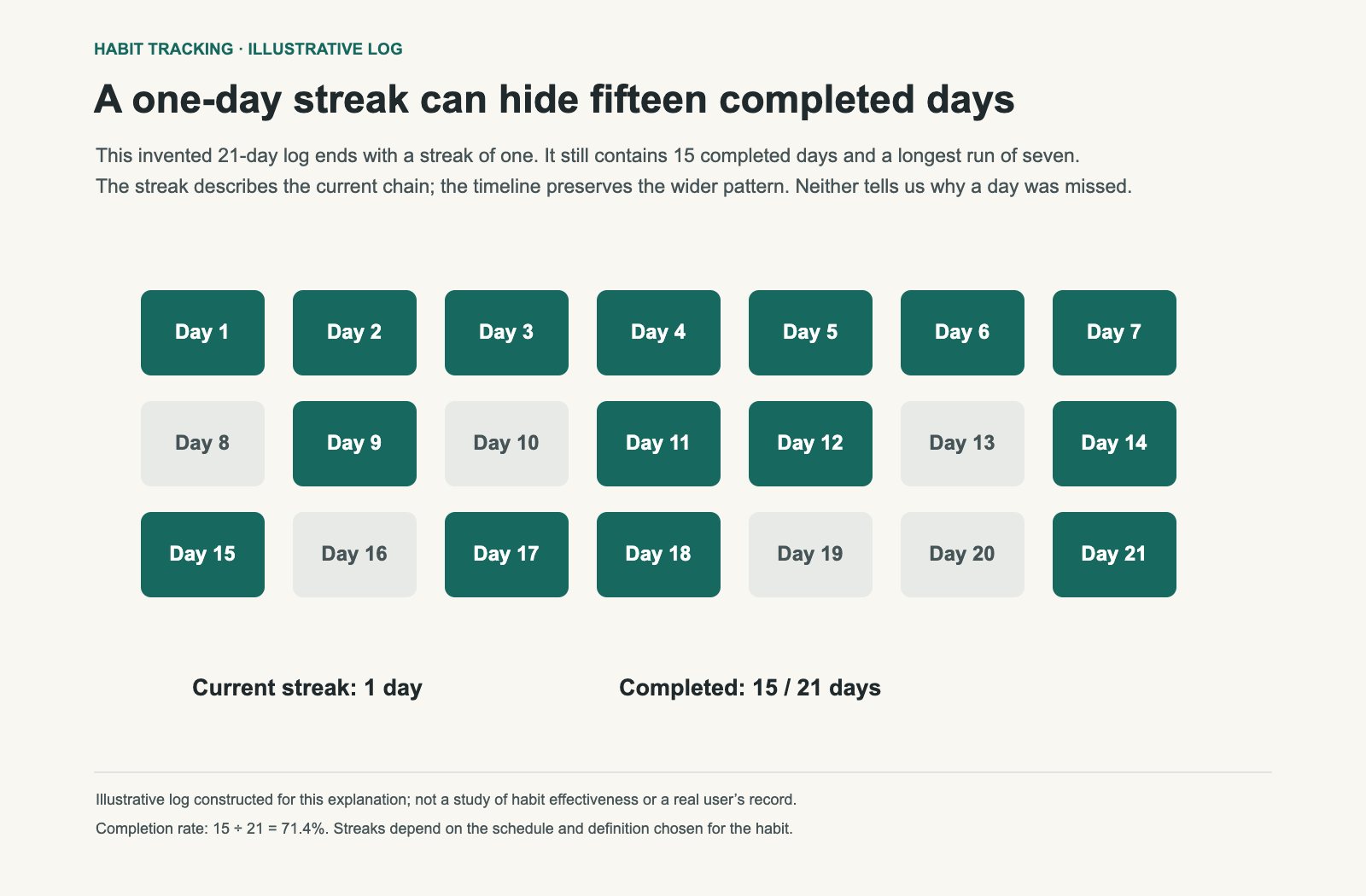
A current streak of one day can sit beside fifteen completed days in a three-week record. The streak describes the unbroken run ending today. The timeline shows the work done before the most recent gap.

Consider an invented twenty-one-day log: the first week is complete, later weeks include several gaps, and the final day is complete after two missed days. Nothing about the one-day streak tells you that the person also completed the first seven days or fifteen days overall.

An invented 21-day log contains 15 completed days, a longest streak of seven days and a current streak of one day.
Illustrative log, not a study or a real person’s record. Fifteen of twenty-one days are complete: 71.4%. The current streak is one day; the longest run is seven. All three describe the same history.

Three numbers, three questions

MeasureExample resultWhat it shows
Current streak1 dayThe run ending on the final day
Longest streak7 daysThe longest consecutive run
Completion rate15 of 21 · 71.4%The share of scheduled days completed

A change from seven to zero on a streak counter does not erase the earlier completions. It changes one summary of the record.

Use a streak for a genuinely daily action

A consecutive-day count is easy to interpret when the action is meant to happen every day. It gives a direct answer about the current run and can make the next scheduled action easy to identify.

It is less useful when the intended schedule is three workouts a week. Four days without a workout may include planned rest days. Define the schedule before deciding what should count as a missed action. Some trackers count scheduled completions rather than consecutive calendar days; check which definition yours uses.

Use a timeline to investigate the gaps

Dates and brief notes can help you identify recurring gaps. Check weekends, travel dates and the times of completed sessions. Then choose a pattern you want to investigate.

A pattern suggests an experiment; it does not establish a cause. If you often miss a walk after a late meeting, try a lunchtime slot for a week and compare. Keep the note specific enough to guide the change.

Distinguish doing from recording

A blank entry may mean the action was missed, the logging was missed or the day was not scheduled. Decide how to record those states. Otherwise a completion rate can look precise while its meaning remains uncertain.

For the diagram, every day is scheduled, every blank is a missed completion and the last day is the day being reviewed.

Review one adjustment at a time

  1. Choose a short review window, such as the past two weeks.
  2. Read completed days and gaps together.
  3. Identify one practical obstacle you can change.
  4. Try a smaller action, different time or clearer reminder.
  5. Compare the next window using the same logging definition.

If the routine is irregular by design, timestamps or a weekly total may be the most informative view. If daily consistency is the goal, a streak can sit beside the full record.

Keep the record proportionate to the decision

A short note such as “late shift” can be enough. You do not need an elaborate diary to decide whether mornings work better. Use Timeli or another log that keeps the needed dates visible, and read how to evaluate a tracker before building a long history.

I built Timeli with a timeline because I wanted to see the whole record, including gaps, instead of treating one missed day as a reset.

Download the illustrative log. This article compares summaries of a record; it does not claim that either display improves adherence for every person.